3D Table Control
by Hansterhart · via Thingiverse
| Format | ZIP |
| Category | Other |
| License | CC BY-SA |
| Uploaded | Apr 20, 2026 |
⬇ 6 downloads
❤ 1 likes
👁 97 views
Description
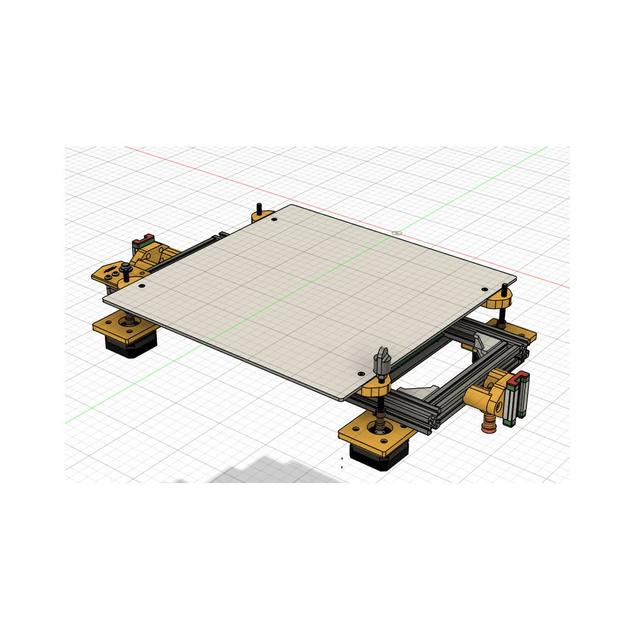
Am I a lazy guy? Well, not particularly, but I don’t like to do things that aren’t necessary. I do a lot of 3DPrinting. I have built myself a BLV MGN Cube printer (thanks Ben Levy for this great design!) with a Duet2 Wifi board, and I’m very happy with it. Only…..well, using a 3D-Printer is an easy job, once you’ve got yourself an .STL file, a slicer and a 3Dprinter you can go ahead and make something yourself. The only thing remaining is setting up the whole circus to get the 3D-Printer to produce something useful, not spaghetti. One of the, in my eyes, most important things is getting the printer table absolutely horizontal. On my BLV MGN Cube printer, the table can be set by adjusting the 4 screws holding it. With the Duet2 software you do a G30 move on the printer to establish a reference point and with the G29 command you measure the position of the table compared to the nozzle position. You take your measurement, open and read out the heightmap.csv file and adjust again, measure etc. Remember, the table has to be absolutely flat and horizontal, seen from the perspective of the nozzle of course. And it is exactly this whole process I wanted to make a bit easier. So, I thought: why not use 4 stepper motors instead of the 4 handwheels. The sequence would then be: With G30 establish a reference point Use G29 to measure 4 points near the stepper motors. Read the measure values from the heightmap.csv file. With the aid of 4 stepper motors correct the settings according to the 4 measured values. Do another G29 check to check if everything is all right now In general, this is it. You end up with a perfectly horizontal table. The printer will be very grateful to you and present you a fantastic product. I hear you say; the system has its own way of correcting the position of the table while it’s printing. Why do we need 4 extra stepper motors. Well, indeed, the system can correct the position of the table. While it is printing. But that’s only on two spots on the table, there where the Z-axis threaded rods are. I’m using it now for some time and I’m happy with it, very happy that is. My results have improved a lot and it is very easy to get to the right starting position for my prints. The enclosed files, cover all parts of the TableControl system. The only changes you might need to perform is on the connection of the threaded rods with the stepper motors to the table. This is different for any printer on the market. But all printers have some means of levelling the table. The system consists of a PCBoard controlling 4 stepper motors hooked up to the 4 corners of the table. The software, running on an ESP32-WROOM-32 MCU reads the heightmap data after a G29 command from the Duet board and sets the stepper motors so that the table is horizontal. The data measured via the heightmap file is presented to the user. By clicking on the "Go" button the stepper motors are set, resulting in a perfectly horizontal table. All WIFI settings are controlled via WifiManager(tzapu) routines. You need a mobile phone to set them. The software needed to run the system is designed using Visual Studio Code. It can be ported to Arduino by importing the files into the Arduino IDE. I have added the KiCAD files for the PCBoard. You need KiCAD version 9.0 or higher to alter them. Use KiCAD to produce the Gerber files you need for ordering the PCBoard at JLCPCB.com Oh, before I forget, one other point. I’m not an electronics engineer. Even worse, I’m a mechanical engineer, and it’s getting even more dramatic, I’m a marine engineer. :) I taught myself the electronic stuff, using KICAD, for designing boards etc. Now, I’m fully aware that there might be things not completely right with the board from an electronics engineering point of view. Maybe it could be designed much better. I fully appreciate that a university level electronics engineer has lots of remarks. OK, tell me and I’ll change the board so that it ends up being an even better product. However, the board as it is right now, works like a charm. If that can be any better, let me know! If you like to buy me a cup of coffee: https://paypal.me/JterHart856?locale.x=nl_NL&country.x=NL
Originally published on Thingiverse





