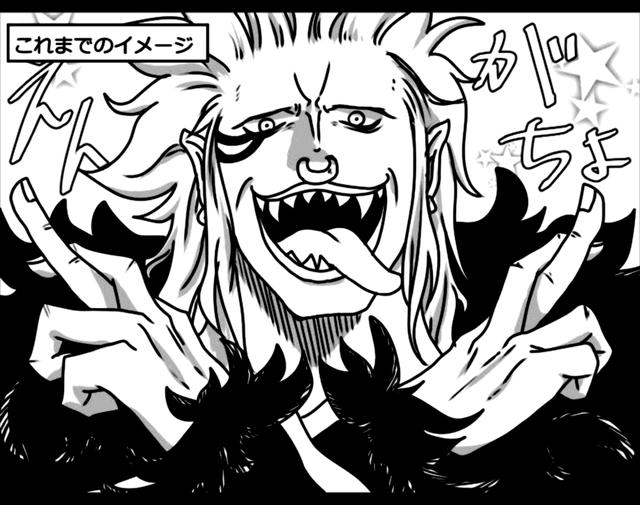
Bartolomeo - One Piece Manga Panel
by brannonmay · via Thingiverse
| Format | 3MF |
| Category | Art |
| License | CC BY-SA |
| Uploaded | Mar 30, 2026 |
⬇ 1 downloads
👁 5 views
Description
Bartolomeo This model is derived from a cleaned and processed manga panel. The source image was refined in Procreate to remove printing artifacts, then converted into a 3D model using [Kromacut](https://kromacut.com/ "With a Title"). All panels are standardized to a height of 1.1 mm. This was an intentional balance between visual fidelity and material efficiency, using significantly less filament than many comparable prints. Whether that tradeoff is preferable will depend on your printer and tolerance for detail loss. The preview image serves as a reference of the intended outcome and can be used if you choose to slice the model yourself. If you scale the model at all, maintain the 1.1 mm height. Altering this dimension changes how the grayscale layers map to physical layer heights, which can disrupt the intended contrast. If you do adjust the height, you will need to recalibrate layer assignments based on your printer’s settings and filament transitions. #Print Profile First Layer: 0.2 mm Layer Thickness: 0.15 mm ##Slicing Black Layers: 2 (Pause after 2nd layer) Gray Layers: 2 (Pause after 4th layer) White Layers: 3 If you want to print using only black & white, the thin profile allows the gray values to translate into layered depth, with the darker regions protruding through the white. Just start the gray with white layers. #Additional Read This is not a standardized workflow. The preprocessing decisions, particularly the removal of any halftones, were made to improve print clarity but may not generalize across all panels or printers. There is no standard way of printing these panels, and successfully printing them will likely require experimenting on your own. If you would like to attempt slicing these in Kromacut, I recommend the following: ##Quantization Settings # of Colors: 3 ##3D Conversion Layer Height: 0.2 mm First Layer Height: 0.15 mm ##Color Slice Heights Black: 0.35 mm Gray: 0.3 mm White: 0.45 mm This will ensure the generated model (1) distinguishes from 3 colors, (2) models them in that order, and (3) your printer prints enough layers to fully saturate over the black. ##Rationale for Layers 5 TOTAL layer gradients from black to white ##Color Slice Black Black (these first 2 layers will be very thin) Black + 1 Layer White Black + 2 Layers White (these 2 white layers should be transparent enough for the end result to just be grey) Black + 3 Layers White Black + 4 Layers White Black + 5 Layers White (this layer should be full white by 5th layer over the black)
Originally published on Thingiverse





