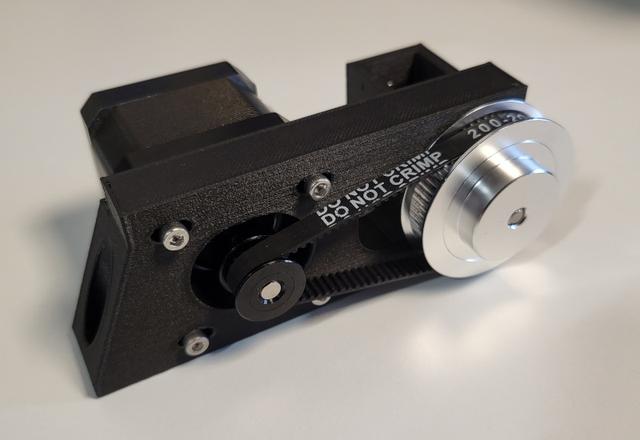
Belted Geared Z - 60/20 teeth - 3:1 ratio - Rook 2020
by Rappetor · via Printables
| Format | STL |
| Category | Art |
| License | CC BY-NC |
| Triangles | 3.7k |
| Uploaded | Oct 19, 2024 |
⬇ 84 downloads
❤ 16 likes
👁 830 views
Description
I got myself some really cheap 60/20 teeth sets and figured I would use this instead of the 80/20. But that meant I had to make the mount myself, so I did. This will work with a 60/20 (3:1 ratio) set with a 200mm closed belt. BOM : - 60 teeth GT2 pulley (5mm bore) - 20 teeth GT2 pulley (5mm bore) - 200mm GT2 (6mm) closed belt - 2x F695 bearings - 5mm D-shaft (60mm in length) - 2mm spacer (I used 2x M5 rings) * (- nema 17 motor with 20t pulley) (- 2x M5x8 bolts & 2x M5 t-nuts) How-To * I'd suggest you place the 20t pulley loosely on the D shaft, route the Z belt and measure what spacer (or number of rings) you need; this is to keep the shaft in place. See the red line in the top image where you need to put the spacer/ring(s). Attach the 20 teeth pully first on the motor before mounting the motor. You can move the motor all the way towards the 60 teeth pulley and then put on the 200mm belt. Then tension the belt a bit and torque down the motor. The whole thing is mounted with 2 M5x8 bolts on some M5 t-nuts, you can move it left/right to get the Z belt in the exact spot. Why? Geared Z will give you more resolution when printing and makes sure the bed doesn't come crashing down when power is removed from the motors. Test piece Please use the included ‘F695 Test Fit Piece’ to make sure your printer is calibrated correctly (or you can make the necessary adjustments needed). The bearings need a tight (press)fit so they don't fall out. Test piece prints in both orientations, so you can check them both. Print settings With a .4 nozzle, .2 layer height, I used 4 walls and 20% gyroid infill. And that thing is solid! I used PETG-CF for this. See slicer screenshot for print orientation (although printing it on it's front/face should also work, hence the double test piece). Klipper settings I only needed to add ‘gear_ratio: 3:1’ to my [stepper_z] config to make the gearing work. So my rotation config (with default 1.8° stepper motor and 20 teeth pulley) is now this: rotation_distance: 4 full_steps_per_rotation: 200 gear_ratio: 3:1 Do not forget to change direction when you come from a ‘direct’ non-geared Z driven setup (put a ! in front of the dir_pin, or remove the ! if it's there already). Since the gearing changes the direction. Example: dir_pin: !gpio28
Originally published on Printables





