BentoBrain - A BentoBox Automation Solution
by andrepadua · via Printables
| Format | STL |
| Category | Art |
| License | CC BY-NC-SA |
| Triangles | 5.7k |
| Uploaded | Feb 12, 2024 |
⬇ 21 downloads
❤ 16 likes
👁 957 views
Description
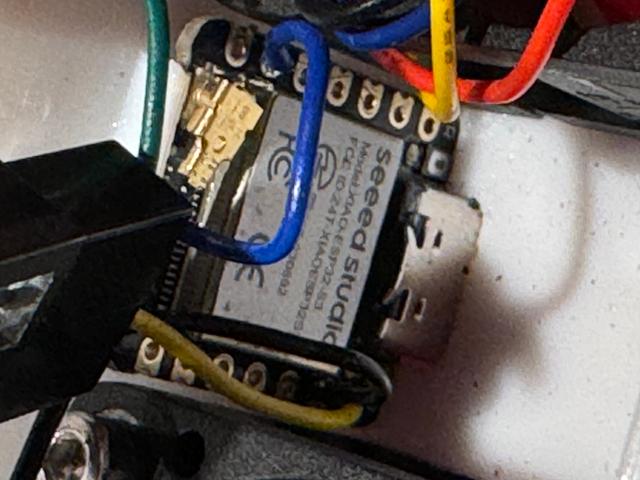
I was looking for a solution to automate the use of the BentoBox v2. I decided to use the nozzle temperature as a parameter since i could differentiate between OFF, PLA, and ABS/ASA/NYLON based on temperature. Currently i run it during any print, including PLA. The entire BentoBox is powered by a single USB-C cable that connects directly to the ESP32 board. You can sneak a USB cable through the cracks in the printer or build a buck converter inside the printer and hide it. To build the automation i added a tiny ESP32 processor between the 4020 fans. I used this chip: https://www.amazon.com/gp/product/B0BYSB66S5/ref=ppx_yo_dt_b_search_asin_title?ie=UTF8&psc=1 To keep things tiny, i needed 5v fans so i didn't have to use a buck converter inside the BentoBox. I also didn't want to run both 5v and 12/24v to the box. I used these Fans: https://www.amazon.com/gp/product/B07WCZ9ZL4/ref=ppx_yo_dt_b_search_asin_title?ie=UTF8&th=1 The code can be obtained in my Github . I welcome all modifications and upgrades! App Code: GitHub - apadua/BentoBrain: BentoBox v2 control via ESP32 and PWM fans Because this is running by subscribing to the printer's MQTT events, a million enhancements are possible. If you look at my code you'll see it works but also it will be vary obvious that i'm not a developer - i hacked it until it worked.
Originally published on Printables





