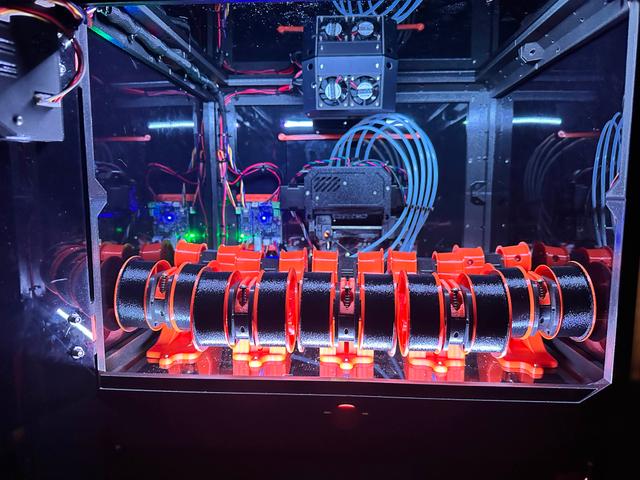
Coreboxx Semi-Smart Remix for Larger OLED 128x128 Screen and/or Digital LED Strip Lighting
by DigitalMechanic · via Printables
| Format | STL |
| Category | Art |
| License | CC BY-NC-SA |
| Triangles | 18.4k |
| Uploaded | Oct 8, 2025 |
⬇ 80 downloads
❤ 18 likes
👁 620 views
Description
There are basically 2 mods available here, in 3 variations… If you want to upgrade the screen to the SH1107 128x128 OLED and add COB WS2811 LED strips, then use the “Modified_3dmonkey_semismart_SH1107_COB_LEDs-v1.6.zip” file. If you want to just upgrade the screen to the SH1107 128x128 OLED (no LED stirp lighting) you can use the “Modified_3dmonkey_semismart_SH1107_COB_LEDs-v1.6.zip” file. It will have the LED strip lighting logic in it, so the Servo header will not be available anymore, but the screen will work just fine without any LED strips connected. If you do not want to upgrade the screen but want to add the COB WS2811 LED strip lighting, you will use the “Modified_3dmonkey_semismart_SSD1306_orig_screen_COB_LEDs-v1.5.zip” file instead. This is not a beginner level modification, please read through the entire description and make sure you are comfortable with the changes being suggested. We are manipulating low voltage electricity, but if you do not know what you are doing something could get damaged or you could get hurt. Possible Modifications: Upgrade 128x64 SSD1306 screen to 128x128 SH1107 screen. Requires... A new Arduino nano R4 (The current Arduino nano that came with the kit is not powerful enough to support the larger 128x128 OLED screen) Solder female headers to new Arduino. A new HMI print, which you can download and print the STL files for. Have to re-pin the HMI cable that goes into the screen (wires are ordered differently between screens) Upgrade to 24V COB strip LEDs with digital control by the Arduino R4. Requires... A new Arduino nano R4 (The current Arduino nano that came with the kit does not have enough room on it to store all the lighting modes/shows). Uses Arduino Pin D12 which can be picked up from the bottom Servo header pin on the Semi-Smart PCB. (This is a 3 pin JST-XH connector, you will only use 1 pin though). Make a wiring harness with 24V leads from the power supply and a separate D12 pin lead from the bottom pin of the servo header on semi-smart board. (use 16-18 AWG wire from the power supply to the first strip, you are carrying 24V across a decent span of wire to the first LED. I used bullet terminals behind the printer for a quick disconnect, and pulled power straight from the power supply to the LED strips, as this allows an easy disconnect if you have to remove the Coreboxx from atop the CoreOne printer for maintenance) Solder or make connections to LED strip lighting. Make/solder more connections for wires to join strips together (if more than 1 strip). If you solder on LED strips, use clear silicone to protect solder points. Parts List (Both/Either Mods): Arduino Nano R4 (without headers) - $12.10 @ Arduino Store Female PCB Header 15 Way 2.54mm Pitch Connector (solder to each side of Arduino Nano R4) - $10 Search Amazon TIP - Take the old Arduino and put the male pins in the female headers you are about to solder. Flip it over and place the new Arduino Nano R4 on top. Everything will be held in the perfect position to solder. Parts List (Screen Mod): SH1107 128x128 OLED Screen (Get IIC version, not SPI)- $12 Search Amazon HMI → OLED cable (Can just re-pin this, otherwise can search to have something custom made) NOTE: There is a knockoff/Alternate version of the SH1107 that has been identified, which has a mislabeled IIC address of “0x7A or 0x78”. It has been tested and confirmed to actually run at the expected 0x3C address, so it is a viable option despite the mislabeled address. Also, coincidentally, the header pinout on this screen happens to exactly match the original smaller screen that came with Semi-Smart kit, so this screen does not need the wiring harness to be re-pinned. It is being advertised as model #MC01506 if anyone is interested. Parts List (LED Strip Lighting Mod) I used 24V COB LED strips, but you can use any WS2811 24V strip with a single data lane - $20 Search Amazon (I used this… SEZO RGB Smart IC COB LED Strip Lights Addressable WS2811 IC 24V 16.4ft/5m 576LEDs/m IP30 Color Chasing Flexible FCOB RGB Tape Light) 16 Gauge wire for positive and negative 24V leads - Search Amazon JST-XH connector to tap into D12 Arduino pin (bottom servo header pin) - $7 search Amazon Having various ring connectors, bullet terminals, and heat shrink tubing on hand is helpful For the LED strips you will be doing a bunch of soldering. You will need to think about your main power 24V disconnect (I used bullet terminals right behind the entry point into the Coreboxx), the connectors for the LED strips (if any), and the connectors between different sets of LED strips. Do you want it permanently connected or do you want a quick disconnect? This is all personal preference. I would at least make the 24V quick disconnects using bullet terminals behind the Coreboxx so you have an easy way to “physically” remove the Coreboxx from the CoreOne printer if need be. Always put the female side of the bullet terminal on the side of the wires the power supply is (where the power is coming from). This way when you unplug from the power supply the hot/powered leads are protected. Feel free to add a 3A-5A inline fuse if you want (I did not though) For placement, I used 2 strips of 60 LEDS each, one on the top and one on the bottom of the inside edge of the Coreboxx frame. The LEDs I purchased have a 3 pin connector already, so I just soldered the 16 gauge wire into the 24V+ and 24V- and used heat shrink on them, and then soldered the smaller wire for the JST-XH (servo pin) to the “Data In” wire. Then I made another length of wires to span from the top to the bottom of the Coreboxx (connecting the top and bottom LED strips) and soldered them to the corresponding leads. Finished up with a little clear silicone to protect the soldered leads on the LED strips. Depending on how many individual LEDs you are using you may need to change the number of LEDs setting in the code. It is easy to do. In the main 3dmonkey_semismart.ino file find this section of code at the top of the file…. LEDManager ledManager(12, 120); // (pin, number of LEDs) Change the “120” to whatever number of LEDs you are running on your strips. Instruction guide for LED strip installation is available under the “Files” tab… Operating Instructions: There are 10x LED patterns programmed at this time, but I will probably add more as time permits. On the main/default screen of Semi-Smart's LCD, if you push the bottom button on the HMI (that would otherwise not have previously done anything on that screen), it should cycle through the lighting modes I have loaded. If you long press the bottom button, it will cycle through brightness levels. Disclaimer - Any modifications you make to your CoreOne or Coreboxx are your responsibility. These are only suggestions and it is recommended that you thoroughly test any changes you make to ensure it is safe. You are responsible for the design and implementation safety of any changes you make to your equipment and the safety of yourself. Change Log: 2025-09-09-v1.1: Initial functional/stable release 2025-09-09-v1.2: Added debounce for LED button and long press for brightness change 2025-09-10-v1.3: Modularized LED code into it's own Library 2025-09-10-v1.4: Added EEPROM to save LED settings, and persist after power loss. 2025-09-10-v1.5: Added LED color patterns. There are 10x now. 2025-10-07-v1.6: Added UI enhancement to show Light Show name on screen. Added additional Halloween Inspired light shows.
Originally published on Printables





