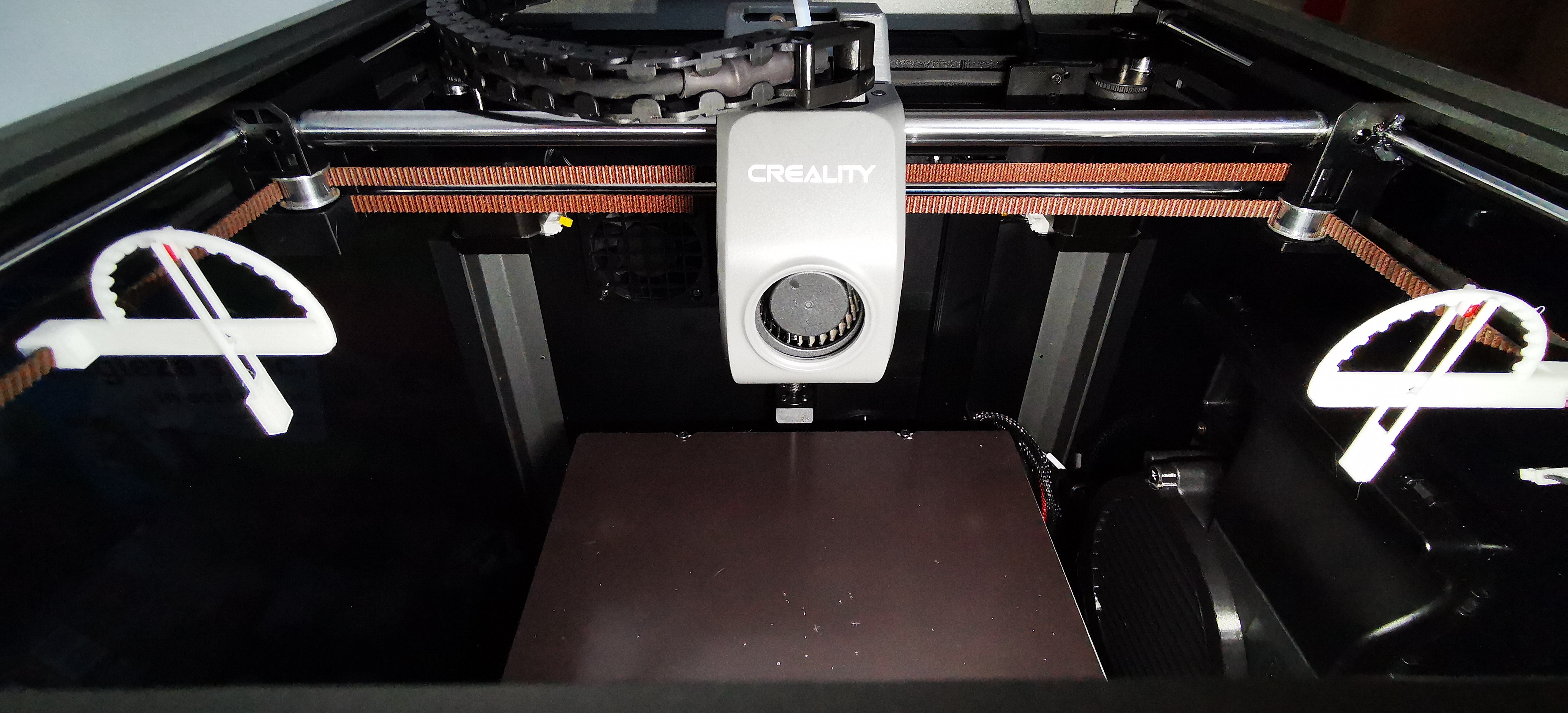
Creality K1 belt tension meter
by RaduSorin1 · via Printables
| Format | STL |
| Category | Art |
| License | CC BY |
| Triangles | 1.8k |
| Uploaded | Jul 9, 2023 |
⬇ 21.7k downloads
❤ 1.5k likes
👁 58.7k views
Description
Description Creality K1 and other printers. Belt tension meter to adjust belts at same and correct tension. If you print it right, when the needle is in the middle, the belts tension should be at 110hz. Settings: Nozzle: 0.4 Line height: 0.2 Line width: 0.4 Supports: No Brim/Raft: No Infill: 100% Walls: 3 Top/Bottom layers: 3 Material: White PLA from Sunlu, the model had 1.94g Installation: Combine the needle with main body. Needle protuberance should be oriented towards belt. Move the X axis away from front. Belt length from front pulley to X gantry should be 150mm. Head should be in the middle of X so you have left belts same length. Install belt meter in the middle of the belt at approximately 75.. Observe needle position. Middle should be 110Hz. Adjust belts if needed.
Originally published on Printables





