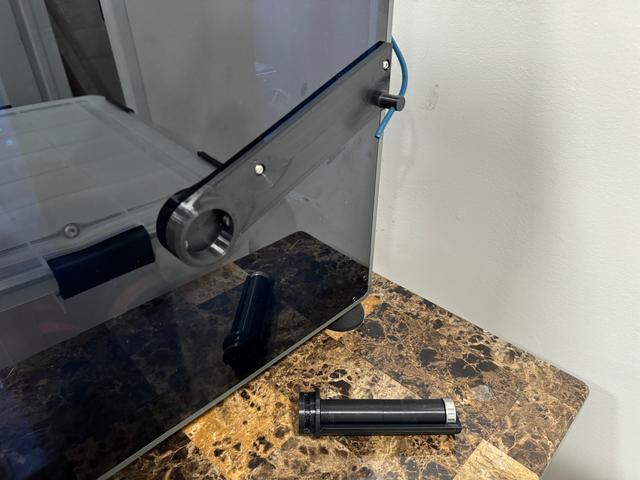
Creality K1 / K1C Side Mount Spool Adapter with Moving Bowden Peg
by the1maximus · via Printables
| Format | STL |
| Category | Art |
| License | CC BY-NC |
| Triangles | 4.4k |
| Uploaded | Aug 11, 2024 |
⬇ 505 downloads
❤ 50 likes
👁 2.9k views
Description
Updated August 11th, 2024: Modified mount for use with Creality K1C. Thank you to @Willem_337986 for printing the modified version to test compatibility. This is a variant of my other side mount that incorporates the spool holder directly on the side mount. NOTE: This is only for the Regular K1 / K1C not the K1 Max. Things You'll Need: 6.5 inches (165mm) of Bowden Tube M3x12 Screw to replace the front screw M3x10 Screw to replace the back screw I took the side mount that MDFPereira had designed and modified it to be able to take the spool roller I designed. It can also take any spool mount that works on the back of the printer. I figured if someone had already printed a Spool Roller they like, they can just print this instead of my model that has it built onto it. This version is also good if you tend to move the machine a lot, this way you can remove the roller and not have it perturding off the side. I originally saw the version CHEP used on his K1 Max, which he added a peg to, to put the Bowden tube through. I liked the idea that CHEP had with the Bowden tube, but I didn’t want to have to relocate the run out sensor, so that’s when I came up with this. The peg on my mount is not fixed in the model, it’s Printed in Place and can spin freely once it's broken free. On this version the peg is 3mm higher to accommodate the height of the spool holder's collar. I replaced the piece of the Bowden tube at the bottom of the run out sensor with a 6.5 inch (165mm) piece, that slides through the hole in the peg (It’s a tight fit), if you can't get it through make sure there is no debris in the hole. The moving peg allows the Bowden tube to flex to prevent it from pinching. I found that 1 inch (~25mm) of Bowden tube coming out of the peg provides the best angle for the filament to unwind while printing. You can adjust the angle by adjusting how much of the bowden tube is coming through the peg. Additionally the filament will keep the spool on the roller, so you don't have to worry about it falling off. My Spool Roller that works with this can be found here: https://www.printables.com/model/648282-creality-k1-k1-max-spool-roller The version of the mount that has the spool holder incorporated on it can be found here: https://www.printables.com/model/661245-creality-k1-side-mount-spool-roller PRINT SETTINGS I used Creality Print to slice the model, so keep in mind that these are the settings that worked for me and YMMV. I purposely exported it to be on the bed diagonally. I found that the side fan can cause some warping, so the solution I found that worked for me was repositioning it on the bed and to also use a Brim. Creality Print w/ Advanced Settings. Default K1 Profile Quality: Normal 0.2 mm Filament: Creality - Black - Hyper PLA Modified Settings Shell Walls:5 Top/Bottom Pattern: Lines Bottom Pattern Initial Layer: Lines Top Surface Skin Pattern: Concentric Infill Infill Density: 100% Infill Pattern: Lines Support Generate Supports: ✔ Support Structure: Normal Support Pattern: Zig Zag Material Printing Temp: 240º Initial Printing Temp: 240º Final Printing Temp: 240º Build Plate Temp: 60ºC (I use a Textured PEI Plate) Build Plate Initial Temp: 60ºC Build Plate Adhesion Build Plate Adhesion Type: Brim
Originally published on Printables





