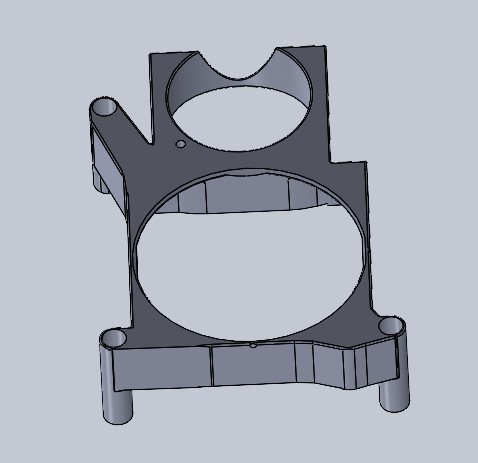
Creality K1 mainboard fan bracket
by Davethegearhead · via Printables
| Format | STL |
| Category | Art |
| License | CC BY-NC-SA |
| Triangles | 23.2k |
| Uploaded | Nov 2, 2023 |
⬇ 178 downloads
❤ 49 likes
👁 1.9k views
Description
This bracket mounts the mainboard fan that is currently bolted to the bottom cover directly to the mainboard and adds an additional 4010 fan. You remove 3 mainboard mounting screws and replace with bracket & 3 M3 SHCS. I wanted to be able to cool the MCU when the printer is idle but since the current mainboard fan is controlled with the heatbreak fan, I had to connect a second fan to the extra fan port on the mainboard. This fan can be temperature controlled. You will need root access so as to modify the printer.cfg file. Comment out this section: #[temperature_sensor mcu_temp] #sensor_type: temperature_mcu #min_temp: 0 #max_temp: 100 Add this section: [temperature_fan MCU_fan] pin: PA0 kick_start_time: 0.8 off_below: 0.1 max_power: 1.0 sensor_type: temperature_mcu control: pid min_temp: 0 max_temp: 100 pid_kp: 1.0 pid_ki: 0.5 pid_kd: 2.0 min_speed: 0.1 max_speed: 0.8 target_temp: 38
Originally published on Printables





