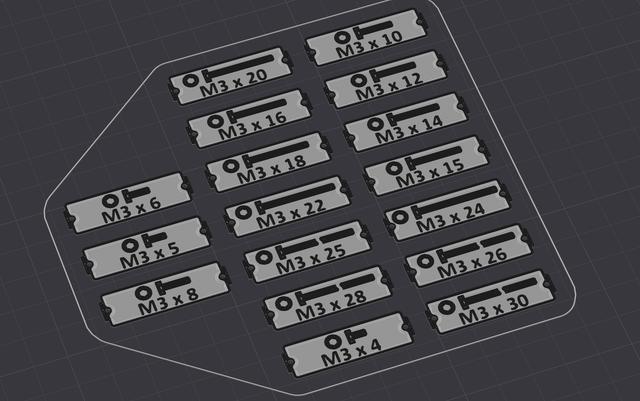
DIN 7984 Low Head Allen Bolt Gridfinity Printable Label
by Lush · via Printables
| Format | STL |
| Category | Organisation |
| License | CC BY-NC |
| Triangles | 12.2k |
| Uploaded | Dec 8, 2024 |
⬇ 60 downloads
❤ 9 likes
👁 259 views
Description
Thanks to @Eistee_158202 for providing the resources that allowed me to generate the labels. For more info have a look at: https://www.printables.com/model/676564-gridfinity-bin-labels-hexagon-socket-head-cap-scre I uploaded only a few for preview M2-M4, for more options have a look at the zip files provided. For M2.5 the parametric text floating precision has to be changed to 1, so it has to be run separatly. Code # Author- # @Eistee_158202 import adsk.core import adsk.fusion import adsk.cam import traceback import os import shutil def run(context): ui = None try: app = adsk.core.Application.get() ui = app.userInterface design = adsk.fusion.Design.cast(app.activeProduct) # Get the root component of the active design rootComp = design.rootComponent # Specify the folder to write out the results. folder = 'C:/Temp/DIN_7984_flat_hex_label' # Get the parameters named "bolt_length_l" and "Box_width" which are defined in my parametric Fusion360 model and change them. MParam = design.allParameters.itemByName('M') bolt_lengthParam = design.allParameters.itemByName( 'bolt_length_l') # Parameter in Fusion360 Box_widthParam = design.allParameters.itemByName( 'Box_width') # Parameter in Fusion360 cnt = 1 # counter for figures M = 3 # Modul of bolt Box_width = 1 # width of the label for M in (2, 2.5, 3, 4, 5, 6, 8, 10): # list of Moduls to be looped through for Box_width in (1, 2): # make the labels in different width for length in range(4, 200): # loop over length of bolt from 4 to 200 if length % 2 == 0 or length % 5 == 0: # only do bolt length if it is dividable by 2 or 5 Box_widthParam.expression = str( Box_width) # make this a string MParam.expression = str(M) # make this a string bolt_lengthParam.expression = str( length) # make this a string app.fireCustomEvent( 'thomasa88_ParametricText_Ext_Update') adsk.doEvents() adsk.doEvents() # Don't know why, but it works only stable if you call it twice # Construct the output filename. newfolder_M = folder + "/" + "M" + str(M) newfolder_width = newfolder_M + \ '/' + str(Box_width) + '_width' # make a new folder os.makedirs(newfolder_M, exist_ok=True) # make a new folder os.makedirs(newfolder_width, exist_ok=True) variantname = str(Box_width) + 'width_M' + \ str(M) + 'x' + str(length) filename = newfolder_width + '/' + variantname + '.stl' # Save the file as STL. exportMgr = adsk.fusion.ExportManager.cast( design.exportManager) stlOptions = exportMgr.createSTLExportOptions(rootComp) stlOptions.meshRefinement = adsk.fusion.MeshRefinementSettings.MeshRefinementMedium stlOptions.filename = filename # Screenshot the variant and save to file screenshotfilename = folder + '/' + \ str(f"{cnt:02d}") + "_" + variantname + '.jpg' app.activeViewport.saveAsImageFile( screenshotfilename, 1600, 1000) cnt = cnt+1 exportMgr.execute(stlOptions) zip_file_path = folder + '/' + \ str(Box_width) + 'width_M' + \ str(M) # zip folder to archive shutil.make_archive(zip_file_path, 'zip', newfolder_width) ui.messageBox('Finished.') except: if ui: ui.messageBox('Failed:\n{}'.format(traceback.format_exc()))
Originally published on Printables





