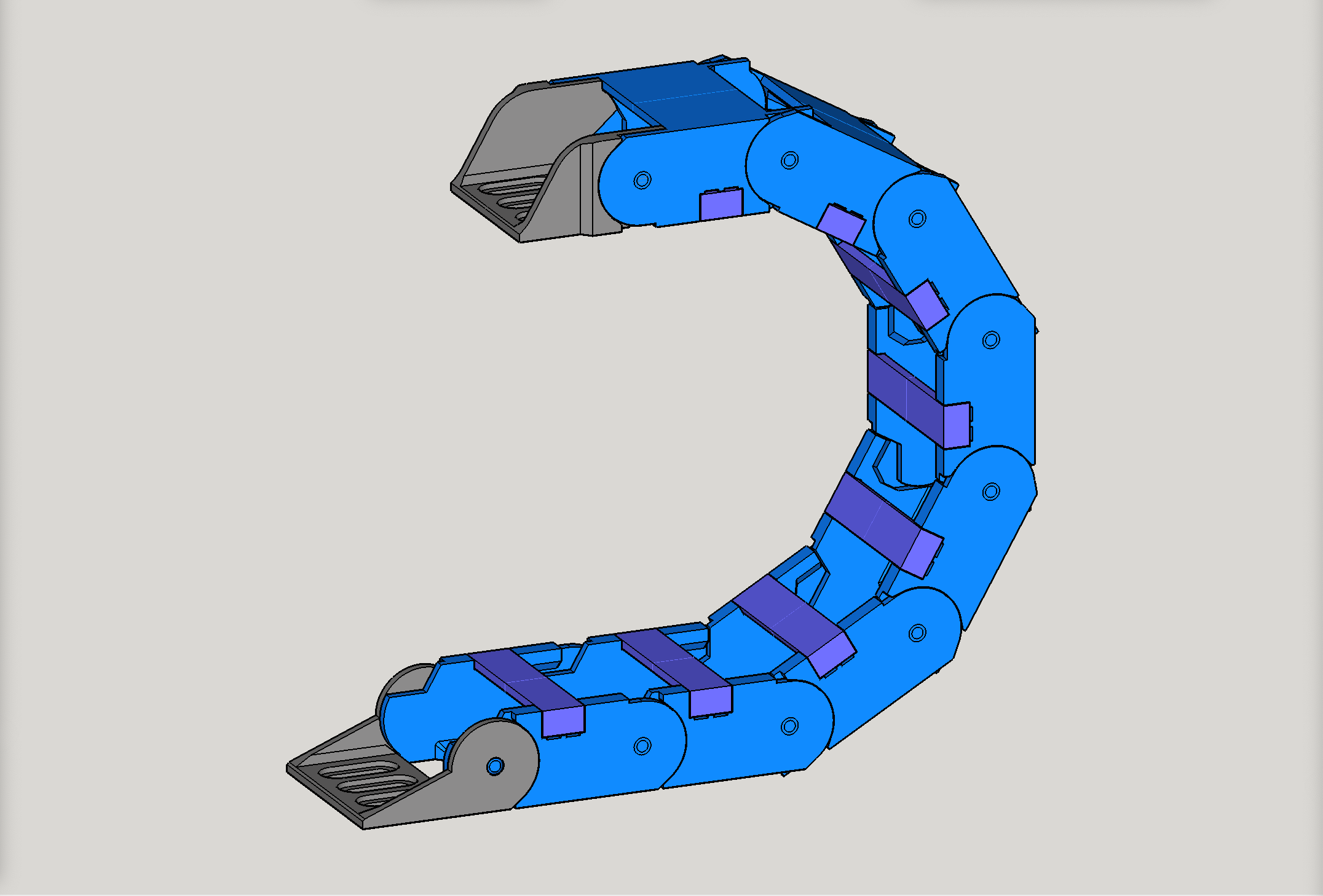
Drag Chain for CNC, two-piece, snap-open, 64mm radius, choose from two sizes: A=20x40mm, B=dual tracks, 20x26mm each (v1.14)
by Doug Joseph (design8studio) · via Printables
| Format | STL |
| Category | Tools |
| License | CC BY-NC |
| Uploaded | Apr 27, 2024 |
⬇ 2.3k downloads
❤ 294 likes
👁 9.4k views
Description
UPDATE April 23-24, 2024 — Remodeled how the retainer clip is attached, to get better grip strength. This involved a remix of both the chain link and the clip. Version 1.14 and up has this. Also, added two new sets. Original was renamed to v1.14-A, while a new, wider “dual channel” version was named v1.14-B. Also, I added a new, experimental version of v1.14-B that has separate clips for each side (for each of the dual channels). Further down is a screenshot of the new experimental version with separate double clips. ————— Two of my recently posted videos feature this same design in actual use on my CNC plasma cutting table, which is based on the LowRider v3. See them below. The second one below shows detail on how I use this drag chain for both X and Y axes on the LowRider 3 that I'm using for plasma. This also pairs with this: https://www.printables.com/model/253880-lowrider-3-plasma-cnc-drag-chain-mount-revised-for Larger sized drag chain for CNC plasma cut tables, CNC routers, CNC mills, power, data, coaxial, and other cables/cords. This is a two-piece, snap-open drag chain, with an inside track dimension of 20mm x 40mm (version A) or the new divided option (version B), which has two inside tracks with a dimension 20mm x 26mm each (for a total inside passageway of 20mm x 52mm, but divided into two inner tracks). These are all designed for a 64mm radius. As such, it should aid in protection against strain for wires/cables that should not be bent in curves tighter than 128 mm in diameter. It's optimized for 3D printing, and prints with no supports needed. Printer Settings No supports needed. Nozzle diameter can be 0.4 mm or (optimally) 0.6 mm. Layer height: 0.3mm Wall thickness: 0.6mm 50%-100% infill Perimeters: 3 perimeters if using 0.4mm wall thickness 2 perimeters if using 0.6 mm wall thickness Number of bottom layers/top layers: 3/3 bottom/top layers if using 0.4mm wall thickness 2/2 bottom/top layers if using 0.6 mm wall thickness 2/2 Printing Tips A given printer’s calibration has an impact on how straight of a line the drag chain (cable chain) holds when suspended. If you find (after printing a batch of the chain links and assembling) that you have some sag, use your printer’s percentage settings to increase flow. If the batch won’t quite lay straight, do the reverse, reducing flow. I would think 3-5% at a time, depending on how far off perfect it is. Maybe only 1-2%. Also, I had my best success at getting the clips printed (the snap-on tops) by printing a whole sheet of nothing but them. For some reason my attempts to print the clips along side the chain links, resulted in the clips separating from the bed and just being a lost part of the print. Thanks to them not being a lot of grams worth, there was not much “spaghetti.” I allowed those flawed print jobs to complete because the chain links were still good. Prepping the bed with a coating of hairspray first is probably a good idea. That and making sure the Z height is zeroed in for that all-important first layer. FAQ Q: How many of the chain links does it take to make a foot (12") length? How many does it take to make a 4 ft length? A: 1 foot is just a teensy bit longer than 7 of them (7 chain links is only about 1.5mm short of 12 inches), and 4 feet is just a teensy bit longer than 29 of them (29 chain links is only about 1.5mm short of 48 inches). Q: Can these be arranged for “print-in-place” printing? A: Perhaps, but seems the answer is no. I attempted that without success. The chain link parts fused to each other. Q: What size screws are to be used for attaching the front end and back end parts? A: M5 bolts/screws are what the mount holes are designed for. Q: The clips open from the inside or outside of the curve? A: Inside. Q: What print orientation within the slicer is best for printing batches of the chain links? A: There are at least two approaches. (1) The first (shown below, first illustration), has the chain links oriented all same way and has the columns “nested” into each other for maximum use of the printer bed (set of 9 on a bed that's 235x235 or so). (2) A friend on the V1 Engineering forum remembered once printing drag chain and having a curve in the resulting chain because the printer had some imperfection. So, he recommends having the chain links oriented in all four directions (shown below, second illustration) to protect against the printer being off a bit. Illustration: chain links oriented all same way with columns “nested” into each other for maximum use of the printer bed: 📷 Image redacted — claim this model to add your own media Illustration: chain links oriented in all four directions to protect against the printer being off somewhat: 📷 Image redacted — claim this model to add your own media As promised, here is a screenshot of the new experimental version with separate double clips. For more details on this, see the change log further down, or the note at the top of the description. 📷 Image redacted — claim this model to add your own media Change log: April 23, 2024: new version 1.14 has better grip for the retainer clips. Also, renamed the original “single track” version as “1.14-A” (at 20mm x 40mm) and added a new “dual track” version 1.14-B (at 20mm x 26mm per track, for a total internal passageway of 20xx x 56mm). August 11, 2022: added screw holes onto mount fronts and ends, so that the mounts become bidirectional, while still being backwards compatible with previous version 1.12 parts. August 4, 2022: provided additional choices so that the fronts and backs can have wires/cords exit “above” or “below.” Renamed design to version 1.12. All added new parts are compatible with the previous versions of this design. July 30, 2022: posted tweaked version of both chain link and snap-on clip, to strengthen the clip's grip on the chain link. My PayPal tip jar: https://paypal.me/design8studio Various LowRider 3 CNC remixes: LowRider 3 CNC Collection View all my models and remixes on Printables: Design8Studio 3D models My Patreon page: https://www.patreon.com/design8studio *Amazon product links are affiliate links.
AI Analysis: This is a mechanical part designed for CNC machining, specifically a drag chain used to guide and secure cables during the manufacturing process. It features a flexible, curved structure with interlocking components that allow for smooth movement of cables while maintaining their position. The blue and purple components are likely made of durable materials to withstand the rigors of industrial use.
Originally published on Printables