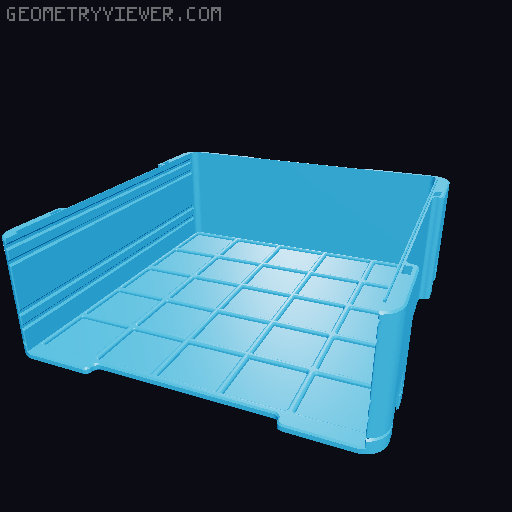
Drawer Box set 23x23cm fitting a Bambulabs printbed
by 3D Mad Mesh · via Printables
| Format | STL |
| Category | Organisation |
| License | CC BY-NC |
| Triangles | 37.6k |
| Uploaded | Dec 21, 2025 |
⬇ 146 downloads
❤ 38 likes
👁 988 views
Description
04-01-'24 Edit added at the bottom! This is an adapted version of my other drawer box set . This adaptation makes it possible to print on a Bambulabs printer. This boxset is 230x230x97mm To make printing easier I have, where neccesary, incorperated “breakaway supports” into the models. The top part needs to be printed upside down. The rectangular pieces supporting the latch hooks will break away very easy after printing. For the latches I made small support blocks for the axle protrusions. The 4 little corner guides on top of the box will need to be glued, these are to help align the stacked boxes. You can leave them if you are not going to stack multiples. Not test printed, but I fully expect it to print just as well as the original drawer set! Recommended print settings: 4 walls at 0.4mm thickness with 0.25 layerheight, except for the drawer grips. Use your own prefered infill settings. I printed the grips with 10 walls at 0.12 with the slanted top part on the printbed. No supports are needed. You could use less walls but I wanted mine to be solid. The grips clamp tight onto the drawer and can be attached withou glue! The top part of the drawer box will need to be glued though, if you want the system to be portable. Still working on inserts and boxes fitting the drawers. 04-01-'24 Edit: Print settings advise: It is recommended to have the following wall printing order. This is to make printing of the overhanging 45⁰ angles of the guide rails, rail slots and bottom chamfer easier and have better wall adhesion. Orca slicer: Inner/Outer/Inner Prusa: Inner/Outer Cura: Inner/Outer 0.4 wall thickness, 0.25 layer height Alternate extra walls Infill before walls 4 Bottom, 4 Top layers Top and bottom pattern zigzag(Cura), NO monotonic line sequence!( Saves me a lot of print time with both Cura and Orca sliced files ) Called “rectilinear” in Orca, set infill direction to 0 Alternative is to reduce layer height to 0.2 and keep outer/inner wall printing order, but this will add considerable time to your prints. Speed is all depending on your specific machine, so use your own best quality speed settings. © Designs by: "3D Mad Mesh" If you like my work feel free to buy me a coffee :) https://buymeacoffee.com/3dmadmesh
Originally published on Printables





