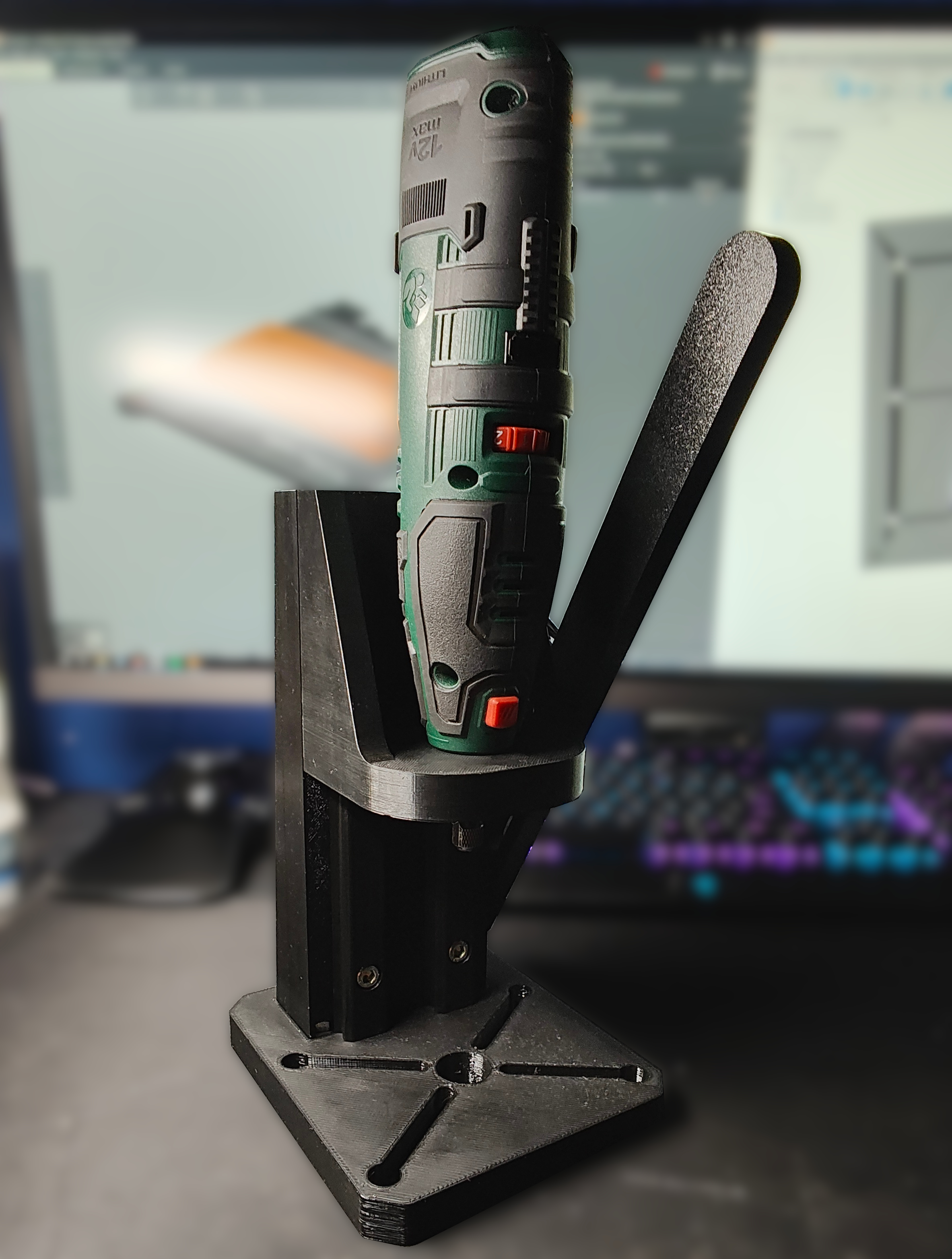
Dremel / Parkside drill press
by LSC · via Printables
| Format | STL |
| Category | Tools |
| License | CC BY |
| Triangles | 31.2k |
| Uploaded | Dec 23, 2024 |
⬇ 1.6k downloads
❤ 1.2k likes
👁 17.3k views
Description
Hi! I want to introduce you my drill press for Dremel/Parkside multitools. It's easy to print and assemble - you only need a few screws and nuts to put it together. IMPORTANT NOTE: Print “Lock_nut_Parkside.stl” and/or “Lock_nut_Dremel.stl” first to check if your multitool is compatibile with this model. If not- you can remix it :) Tested on my Parkside PFBS 12 B6 - works well. Print settings Print with high infill (60-80%), PETG recommended. All files are oriented in the best way. “Base” and “Tool holder” require supports. Bill of material Printed parts: - 1 x Base - 1 x Lever - 4 x Lever sleeve - 1 x Lock nut - choose the correct one according to your multitool - 1 x Tool holder - 1 x Z guide - 2 x Z rail Screws & nuts: - 12 x M6 nuts - Nylock nuts highly recommended - 4 x M6x20 FHCS - 7 x M6x25 SHCS - 1 x M6x30 SHCS Other: - Tension spring (50mm), or rubber bands - Some grease Assembly manual 📷 Image redacted — claim this model to add your own media Put 4 M6 nuts into “Z guide” lower pockets: 📷 Image redacted — claim this model to add your own media 📷 Image redacted — claim this model to add your own media Put “Z guide” into “Base”: 📷 Image redacted — claim this model to add your own media Screw together using 4 M6x20 FHCS screws: 📷 Image redacted — claim this model to add your own media Place 6 M6 nuts into “Z guide” back pockets: 📷 Image redacted — claim this model to add your own media Screw “Z rails” to “Z guide” using 6 M6x 25 SHCS screws. Don't tighten it yet! 📷 Image redacted — claim this model to add your own media Use “Tool holder” to align the rails parallel. If holder moves freely along rails you can tighten screws. 📷 Image redacted — claim this model to add your own media Apply some grease on “Tool holder” grooves: 📷 Image redacted — claim this model to add your own media Put “Tool holder” back on the rails. Double check that everything works fine - if not, align the rails again. 📷 Image redacted — claim this model to add your own media Place the M6 nut into “Z guide” rear pocket: 📷 Image redacted — claim this model to add your own media Apply some grease to the lever hole: 📷 Image redacted — claim this model to add your own media Put M6x30 SHCS with 2 lever sleeves into lever hole: 📷 Image redacted — claim this model to add your own media Screw lever to the “Z guide”. Mind the proper orientation of the lever. The lever must move freely - don't tighten screw too much. 📷 Image redacted — claim this model to add your own media Apply some grease to the elongated hole in the lever: 📷 Image redacted — claim this model to add your own media Put the M6 nut to the pocket in the “Tool holder”: 📷 Image redacted — claim this model to add your own media Put M6x25 SHCS with 2 lever sleeves into lever elongated hole. Screw together with “Tool holder”: 📷 Image redacted — claim this model to add your own media Place tension spring between lever and “Z guide”. Alternatively, you can use some rubber bands - just like me. 📷 Image redacted — claim this model to add your own media Put multitool into “Tool holder” and secure using proper “Lock nut”: 📷 Image redacted — claim this model to add your own media 📷 Image redacted — claim this model to add your own media Optionaly you can use 4 M6 screws with nuts to hold drilled object or to mount some accessories: 📷 Image redacted — claim this model to add your own media 📷 Image redacted — claim this model to add your own media 📷 Image redacted — claim this model to add your own media
Originally published on Printables