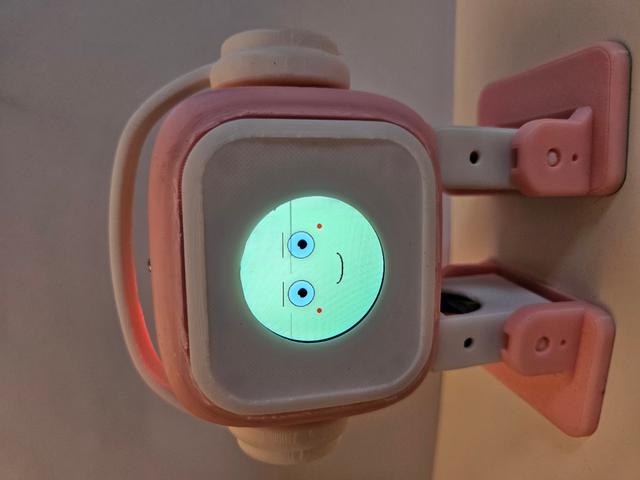
EMOtto Diy _GC9A01_NANO_Shield
by Marco Mortari · via Printables
| Format | STL |
| Category | Mechanical |
| License | CC BY-SA |
| Triangles | 20.4k |
| Uploaded | Jun 4, 2025 |
⬇ 38 downloads
❤ 15 likes
👁 324 views
Description
EMOtto Diy EMOtto, emette suoni e si muove cambiando espressione a seconda dell'emozione , che si cambia sfiorando la testolina. Dopo un po' che non lo tocchi si addormenta . Ma basta sfiorarlo e si Risveglia ! Emozioni Incluse: Felice (Muove gli Occhi e batte le palpebre) Arrabbiato (Muove gli Occhi e batte le palpebre) Sorpreso (Muove gli Occhi e batte le palpebre) Triste ( Muove gli Occhi e batte le palpebre con Lacrime che scendono) Innamorato ( con occhi a forma di cuoricino che pulsano) Addormentato ( Con movimento Bocca e Animazione zzz) Questo Modello Utilizza Come Design il progetto ElectronBot Emo: https://github.com/maker-community/ElectronBot-Peripheral/tree/main/ElectronBot%20EMO . Grazie a Scotty Franzyshen ed ai suo Concept: https://www.tinkercad.com/users/9Wbn1uShxa2-scotty-franzyshen , che mi ha ispirato. Il codice utilizza la libreria Ottodiy per i Movimenti ed i suoni : https://github.com/ottodiy Grazie al Fantastico progetto di Camilo Parra Palacio: https://github.com/cparrapa ed al sito: https://www.ottodiy.com/. Codice Si consiglia l'uso di una stampante 3D FDM. Non sono necessari supporti o raft per piedi e gambe.Supporti necessari per gli altri componenti. Risoluzione: 0,3 mm o 0,2 mm per una migliore risoluzione. Densità di riempimento: 15% Tutti i File Stl sono già posizionati in modo correto per gli Slicer Caratteristiche 👩💻 Programmazione Personalizzabile con Arduino 👣 Si Muove Cambia Espressione 🔊 Emette Suoni Elenco delle parti 🖥 Microcontrollore Otto Nano + SHIELD scheda I/O ver 3 🔌 Cavo micro USB - O USB-C secondo il modello 🔋 7.4V 1200mah Batteria Lipo + UBEC 5V-3A Interruttore a levetta :mts 102 switch ⚙ 4 micro servomotori con set di viti. 🔊 Buzzer passivo Ø12mm Round Display GC9A01 5 Resistenze da 220hom 🌈 8 cavi jumper DuPont femmina-femmina Touch Capacitive TTP223 Cacciavite a croce magnetizzato Testa stampata in 3D Cuffie Stampate in 3D Gambe stampate in 3D (2) Piedi stampati in 3D (2) COLLEGAMENTI ATTENZIONE ! : Per un buon funzionamento l'alimentazione è fondamentale ! Per avere un'idea chiara sulle varie alternative di come alimentare il Tuo progetto Otto Puoi seguire Questa Guida . (li ho provati tutti nel tempo con alterni successi) . Quando si Collega Arduino Nano con tutti i componenti cablati alla porta Usb de PC (se non si ha sbagliato nei cablaggi Tutto Funziona Correttamente, ma se poi Vuoi svincolarti dal Cavo il discorso Cambia.(Continui reset di Arduino , Durata bassissima della batteria, che rendono frustrante l'esperienza). Senza dilungarmi sulle motivazioni alla fine Una soluzione solida per evitare Tutto cio' è: Utilizzare una Batteria 7.4V 1200mah Batteria Lipo Ricaricabile Collegarla ad UBEC 5V 3A Effettuare una Piccola Modifica allo SHIELD Brevemente: Bisogna Alimentare i Servo con i 3 Ampere, per farlo Bisogna collegare direttamente i Servo all'UBEC, ed evitare che i pin Vin prendano alimentazione direttamente da Arduino Nano collegato Alla Shield. Per farlo ci sono diversi modi, e sebbene qui qualcuno avrà da ridire , io ho proceduto cosi: Piegare verso l'interno il pin 5v di Arduino Nano, in modo che non si inserisca nello Shield, ed attacare l'uscita dell'Ubec su qualsiasi pin 5V dell dello Shield. Aternativa per non toccare Arduino Nano e quello di tagliare la traccia 5v sotto lo shield. Fatto Questo si puo procedere con il Cablaggio Vero e Proprio: Pin Shield I/OVinGrdServo1Left Leg25V-Servo2Right Leg35V-Servo3Left foot45V-Servo4Right Foot55V-BuzzerSuoni6(+)5V Display GC9A01ACS220hom>10 Display GC9A01ADC220hom>9 Display GC9A01ARST220hom>8 Display GC9A01ASCL220hom>13 Display GC9A01ASDA220hom>11 Display GC9A01AVin 3,3V Display GC9A01AGrd GrdTTP223TouchA05VGrdBattery 7,4V>Ubec 5V-3ABattery 5VGrd CODICE Attenzione!: Per il funzionamento è necessario Installare le seguenti Librerie. Si possono installare direttamente da Arduino Ide, oppure da GitHub OttodiyLib ver 13.0.0 Adafruit GFX Library Adafruit_GC9A01A Sketch // ---- EMOtto ver 1.0 ----- // // ---- by Marco Mortari ---- // // ---- ver 1.0 3/06/2025---- // // ---- By Daddy for Francesco's Birthday 9 years---- // // ---- Library OttoDiy 13.0.0 ---- // //-- Make sure to have installed all libraries: https://github.com/OttoDIY/OttoDIYLib //--------------------------------------------------------- // ---- Component ---- // // ---- 4 Servo SG90 180 Degrees ---- // // ---- Round Display GC9A01 ---- // // ---- Passive Buzzer ---- // // ---- Touch Capacitive TTP223 ---- // // ---- mts 102 switch ---- // // ---- UBEC 5V 3A ---- // // ---- Battery 7.4V ---- // //-- First step: Make sure the pins for servos are in the right position /* -------- | O O | |--------| RIGHT LEG 3 | | LEFT LEG 2 -------- || || RIGHT FOOT 5 |--- ---| LEFT FOOT 4 */ // ---- Buzzer Pin 6 ---- // // ---- GC9A01A CS=10 DC=9 RST= 8 SCL=13 SDA=11 Wire This Pin with 220hom resistor ---- // // ---- Touch Pin A0 ---- // #include <Adafruit_GFX.h> #include <Adafruit_GC9A01A.h> #include <SPI.h> #include <Otto.h> // Stati modalità sleep enum SleepState { SLEEP_START, SLEEP_BLINK, SLEEP_FACE, SLEEP_MOVE, SLEEP_BREATH_OUT, SLEEP_BREATH_IN, SLEEP_ZZZ, SLEEP_DONE }; SleepState sleepState = SLEEP_START; unsigned long sleepTimer = 0; int breathRadius = 8; int zCount = 0; Otto Otto; // This is Otto! #define LeftLeg 2 #define RightLeg 3 #define LeftFoot 4 #define RightFoot 5 #define Buzzer 6 #define TFT_CS 10 #define TFT_DC 9 #define TFT_RST 8 #define TOUCH_PIN A0 Adafruit_GC9A01A tft(TFT_CS, TFT_DC, TFT_RST); // === PROTOTIPI delle funzioni === void drawExpression(int type); void animateBlink(); void performExpression(int type); unsigned long lastTouchTime = 0; const unsigned long debounceDelay = 300; int expression = 0; const int totalExpressions = 4; // 0..4 (5 espressioni) int lastExpression = -1; bool touchWasPressed = false; // stato touch nel ciclo precedente int pupilOffsetX = 0; int pupilOffsetY = 0; const int touchThreshold = 100; // soglia analogica per considerare “touch” //---palpebre---// unsigned long lastBlinkTime = 0; unsigned long blinkInterval = 4000; // ogni quanti ms far partire un blink spontaneo bool isBlinking = false; int blinkStep = 0; //--- dormire----// unsigned long sleepTimeout = 90000; // 90 secondi unsigned long lastActivityTime = 0; bool isSleeping = false; //----lacrime ----// // Variabili per animazione lacrime con esplosione #define TEAR_COLOR 0x7D7C // azzurro chiaro #define FACE_COLOR_SAD 0x001F // sfondo faccia (blu chiaro kawaii) int tearY = 122; const int tearStartY = 122; const int tearEndY = 160; unsigned long lastTearTime = 0; const int tearSpeed = 50; bool tearJustStarted = true; bool tearVisible = true; bool tearExploding = false; int explosionStep = 0; const int maxExplosionSteps = 4; // -- battiti cuore --// // Impostazioni animazione battito cuore unsigned long lastHeartbeatTime = 0; int heartbeatIndex = 0; int heartbeatSizes[] = {12, 16, 14, 13, 12}; // battito veloce poi lento int heartbeatDelays[] = {50, 80, 120, 150, 200}; // ritmi variabili const int numHeartbeatFrames = sizeof(heartbeatSizes) / sizeof(int); bool isInLove = false; // controlla se animare bool pendingExpression = false; // segnala che abbiamo un’espressione in attesa void setup() { // Inizializza Otto (servi + buzzer) Otto.init(LeftLeg, RightLeg, LeftFoot, RightFoot, true, Buzzer); // Il buzzer è stato già configurato da Otto.init(...) Otto.sing(S_connection); // Suono di avvio (funziona solo qui) pinMode(TOUCH_PIN, INPUT); touchWasPressed = (analogRead(TOUCH_PIN) < touchThreshold); // Inizializziamo touchWasPressed in base allo stato reale del sensore Serial.begin(115200); tft.begin(); tft.setRotation(2); Otto.playGesture(OttoSuperHappy); forceHome(); expression = 0; lastExpression = 0; // sincronizziamo lastExpression con il valore iniziale drawExpression(expression); randomSeed(analogRead(TOUCH_PIN)); // seme per pupille casuali lastActivityTime = millis(); // Avvio monitoraggio attività } void loop() { unsigned long now = millis(); int touchValue = analogRead(TOUCH_PIN); bool touchPressed = (touchValue < touchThreshold); static unsigned long touchStartTime = 0; // --- SLEEP MODE --- if (isSleeping) { updateSleepingAnimation(); // anima il sonno if (touchPressed && !touchWasPressed) { touchStartTime = now; } if (!touchPressed && touchWasPressed && now - touchStartTime > 200) { wakeUp(); } touchWasPressed = touchPressed; return; } // --- DEBUG --- Serial.print("TOUCH raw: "); Serial.print(touchValue); Serial.print(" (< "); Serial.print(touchThreshold); Serial.print(") -> "); Serial.println(touchPressed ? "PRESSED" : "not pressed"); Serial.print("Check sleep: "); Serial.print(now - lastActivityTime); Serial.print(" ms, sleeping: "); Serial.println(isSleeping); // --- CONDIZIONE PER DORMIRE --- if (!isSleeping && (now - lastActivityTime > sleepTimeout)) { Serial.println(">> Condizione SLEEP soddisfatta"); enterSleepMode(); return; } // --- CAMBIO ESPRESSIONE --- if (touchPressed && !touchWasPressed && !isBlinking) { expression = (expression + 1) % (totalExpressions + 1); drawExpression(expression); pendingExpression = true; delay(50); lastActivityTime = now; } touchWasPressed = touchPressed; // --- AZIONE DOPO ESPRESSIONE --- if (pendingExpression && !isBlinking) { performExpression(expression); lastExpression = expression; pendingExpression = false; } // --- BLINK --- if (!isBlinking && (now - lastBlinkTime > blinkInterval)) { isBlinking = true; blinkStep = 0; } if (isBlinking) { animateBlink(); } // --- ANIMAZIONE OCCHI A CUORE --- if (expression == 4 && !isBlinking && !isSleeping) { updateHeartEyes(); // Solo in modalità innamorato } // --- ANIMAZIONE LACRIME --- if (expression == 3 && !isBlinking && !isSleeping) { // triste updateTears(); } } // ******************* FUNZIONI DI SUPPORTO ******************* // void forceHome() { Otto.attachServos(); int homes[4] = {90, 90, 90, 90}; Otto._moveServos(500, homes); // Muove forzatamente, bypassa Otto.home() delay(700); Otto.detachServos(); Otto.setRestState(true); // Mantieni coerenza col flag } void drawEyelids(int height) { // Ricoloriamo parte di occhio con il colore di sfondo “pelle” uint16_t skinColor; switch (expression) { case 0: skinColor = 0xFFF3; break; // NORMALE (giallo chiaro) case 1: skinColor = 0xA800; break; // ARRABBIATO (rosso scuro) case 2: skinColor = 0xF81F; break; // SORPRESO (viola) case 3: skinColor = 0x001F; break; // SAD (blu scuro) case 4: skinColor = 0xFD20; break; // LOVE (arancione) default: skinColor = 0xFFFF; break; } // Occhio sinistro tft.fillRect(60, 80, 40, height, skinColor); // Occhio destro tft.fillRect(140, 80, 40, height, skinColor); // Disegniamo il contorno inferiore della palpebra tft.drawLine(60, 80 + height, 100, 80 + height, GC9A01A_BLACK); tft.drawLine(140, 80 + height, 180, 80 + height, GC9A01A_BLACK); } void animateBlink() { static unsigned long blinkFrameTime = 0; unsigned long now = millis(); if (now - blinkFrameTime < 100) return; // nuovo frame ogni 100 ms blinkFrameTime = now; switch (blinkStep) { case 0: drawEyelids(60); // palpebra a metà chiusa break; case 1: drawEyelids(100); // occhi completamente chiusi break; case 2: drawEyelids(60); // riapertura parziale break; case 3: drawExpression(expression); // ridisegna espressione base isBlinking = false; lastBlinkTime = millis(); break; } blinkStep++; } void drawExpression(int type) { // 1) Cambia il colore di sfondo uint16_t bgColor; switch (type) { case 0: bgColor = 0xFFF3; break; // NORMALE case 1: bgColor = 0xA800; break; // ARRABBIATO case 2: bgColor = 0xF81F; break; // SORPRESO case 3: bgColor = 0x001F; break; // SAD case 4: bgColor = 0xFD20; break; // LOVE default: bgColor = 0xFFFF; break; } tft.fillScreen(bgColor); // 2) Disegna la parte grafica del volto switch (type) { case 0: drawNormal(); break; case 1: drawAngry(); break; case 2: drawSurprised(); break; case 3: drawSad(); break; case 4: drawInLove(); break; } } void performExpression(int type) { Serial.print(">> performExpression, tipo = "); Serial.println(type); switch (type) { case 0: // NORMALE: Serial.println(" NORMALE → Os_happy)"); Otto.playGesture(OttoSuperHappy); forceHome(); break; case 1: // ARRABBIATO: Serial.println(" ARRABBIATO → "); Otto.playGesture(OttoAngry); forceHome(); break; case 2: // SORPRESO: Serial.println(" SORPRESO → "); Otto.playGesture(OttoConfused); forceHome(); // Dovrebbe muovere a 90° e staccare i servi break; case 3: // SAD: Serial.println(" SAD → )"); Otto.playGesture(OttoSad); forceHome(); // Dovrebbe muovere a 90° e staccare i servi break; case 4: // LOVE: Serial.println(" LOVE → "); Otto.playGesture(OttoLove); forceHome(); // Dovrebbe muovere a 90° e staccare i servi break; } } // =========== Parti “volto” (display) =========== // void drawEyes() { int eyeRadius = 20; int pupilRadius = 8; int eyeLX = 80; int eyeRX = 160; int eyeY = 100; // Piccolo movimento casuale delle pupille pupilOffsetX = random(-2, 3); pupilOffsetY = random(-2, 3); // Contorno occhi (nero) tft.fillCircle(eyeLX, eyeY, eyeRadius + 2, GC9A01A_BLACK); tft.fillCircle(eyeRX, eyeY, eyeRadius + 2, GC9A01A_BLACK); // Sclera (bianco) tft.fillCircle(eyeLX, eyeY, eyeRadius, GC9A01A_WHITE); tft.fillCircle(eyeRX, eyeY, eyeRadius, GC9A01A_WHITE); // Pupille (nero) con offset casuale tft.fillCircle(eyeLX + pupilOffsetX, eyeY + pupilOffsetY, pupilRadius, GC9A01A_BLACK); tft.fillCircle(eyeRX + pupilOffsetX, eyeY + pupilOffsetY, pupilRadius, GC9A01A_BLACK); // Riflessi nella pupilla (piccolo cerchio bianco) tft.fillCircle(eyeLX - 5, eyeY - 5, 2, GC9A01A_WHITE); tft.fillCircle(eyeRX - 5, eyeY - 5, 2, GC9A01A_WHITE); } // ------------ Bocche -----------// // --- bocca sorriso ---// void drawSmile() { for (int i = 0; i <= 180; i += 2) { float rad = radians(i); int x = 120 + 25 * cos(rad); int y = 160 + 10 * sin(rad); tft.fillCircle(x, y, 1, GC9A01A_BLACK); // bocca spessa } } // --- bocca dritta ---// void drawStraightMouth() { tft.fillRect(100, 157, 40, 6, GC9A01A_BLACK); } // --- bocca Sad ---// void drawSadMouth() { for (int i = 180; i <= 360; i += 2) { float rad = radians(i); int x = 120 + 25 * cos(rad); int y = 160 + 10 * sin(rad); tft.fillCircle(x, y, 1, GC9A01A_BLACK); } } // --- bocca O ---// void drawOMouth() { tft.fillCircle(120, 160, 10, GC9A01A_BLACK); tft.fillCircle(120, 160, 6, GC9A01A_WHITE); } // --- Guance ---// void drawBlush() { tft.fillCircle(50, 130, 4, GC9A01A_RED); tft.fillCircle(190, 130, 4, GC9A01A_RED); } // --- Sopraciglia ---// void drawBrowsNormal() { tft.drawLine(60, 70, 100, 70, GC9A01A_BLACK); tft.drawLine(60, 71, 100, 71, GC9A01A_BLACK); tft.drawLine(140, 70, 180, 70, GC9A01A_BLACK); tft.drawLine(140, 71, 180, 71, GC9A01A_BLACK); } // --- Sopraciglia Arrabbiato ---// void drawBrowsAngry() { tft.drawLine(60, 70, 100, 80, GC9A01A_BLACK); tft.drawLine(60, 71, 100, 81, GC9A01A_BLACK); tft.drawLine(140, 80, 180, 70, GC9A01A_BLACK); tft.drawLine(140, 81, 180, 71, GC9A01A_BLACK); } // --- Sopraciglia Sorpreso ---// void drawBrowsSurprised() { tft.drawLine(60, 60, 100, 60, GC9A01A_BLACK); tft.drawLine(60, 61, 100, 61, GC9A01A_BLACK); tft.drawLine(140, 60, 180, 60, GC9A01A_BLACK); tft.drawLine(140, 61, 180, 61, GC9A01A_BLACK); } // --- Sopraciglia Sad ---// void drawBrowsSad() { tft.drawLine(60, 80, 100, 70, GC9A01A_BLACK); tft.drawLine(60, 81, 100, 71, GC9A01A_BLACK); tft.drawLine(140, 70, 180, 80, GC9A01A_BLACK); tft.drawLine(140, 71, 180, 81, GC9A01A_BLACK); } // --- Lacrime ---// void updateTears() { unsigned long now = millis(); if (tearJustStarted) { // Mostra il primo frame visivo tft.fillCircle(80, tearY, 4, TEAR_COLOR ); tft.fillCircle(160, tearY, 4, TEAR_COLOR ); tearJustStarted = false; return; } if (tearExploding) { // Animazione esplosione drawExplosion(80, tearY); drawExplosion(160, tearY); explosionStep++; if (explosionStep > maxExplosionSteps) { tearExploding = false; tearVisible = true; tearY = tearStartY; // Pulisce area tft.fillCircle(80, tearEndY, 8, FACE_COLOR_SAD); tft.fillCircle(160, tearEndY, 8, FACE_COLOR_SAD); } delay(30); return; } if (now - lastTearTime >= tearSpeed) { lastTearTime = now; // Cancella precedente tft.fillCircle(80, tearY, 4, FACE_COLOR_SAD); tft.fillCircle(160, tearY, 4, FACE_COLOR_SAD); if (tearVisible) { tearY += 3; if (tearY >= tearEndY) { tearVisible = false; tearExploding = true; explosionStep = 0; } } if (tearVisible) { tft.fillCircle(80, tearY, 4, TEAR_COLOR ); // AZZURRO tft.fillCircle(160, tearY, 4, TEAR_COLOR ); } } } void drawExplosion(int x, int y) { // Cancella centro tft.fillCircle(x, y, 8, FACE_COLOR_SAD ); // Disegna gocce esplose int r = 2; tft.fillCircle(x - 5, y - 2, r, 0x7DDF); tft.fillCircle(x + 5, y - 2, r, 0x7DDF); tft.fillCircle(x - 3, y + 3, r, 0x7DDF); tft.fillCircle(x + 3, y + 3, r, 0x7DDF); } // --- Occhi a cuore ---// void updateHeartEyes() { unsigned long currentTime = millis(); if (currentTime - lastHeartbeatTime >= heartbeatDelays[heartbeatIndex]) { lastHeartbeatTime = currentTime; // Cancella occhi tft.fillCircle(80, 100, 20, 0xFD20); tft.fillCircle(160, 100, 20, 0xFD20); // Disegna nuovo frame cuore int r = heartbeatSizes[heartbeatIndex]; drawHeart(80, 100, r); drawHeart(160, 100, r); heartbeatIndex = (heartbeatIndex + 1) % numHeartbeatFrames; } } // Funzione disegno cuore void drawHeart(int x, int y, int r) { tft.fillCircle(x - r / 2, y - r / 2, r / 2, GC9A01A_RED); tft.fillCircle(x + r / 2, y - r / 2, r / 2, GC9A01A_RED); tft.fillTriangle( x - r, y - r / 2, x + r, y - r / 2, x, y + r, GC9A01A_RED ); } // === Espressioni (volto) === void drawNormal() { drawEyes(); drawSmile(); drawBrowsNormal(); drawBlush(); } void drawAngry() { drawEyes(); drawStraightMouth(); drawBrowsAngry(); } void drawSurprised() { drawEyes(); drawOMouth(); drawBrowsSurprised(); } void drawSad() { drawEyes(); drawSadMouth(); drawBrowsSad(); updateTears(); } void drawInLove() { updateHeartEyes(); drawSmile(); drawBlush(); } void enterSleepMode() { Serial.println(">> Entrata modalità SLEEP"); isSleeping = true; pendingExpression = false; sleepState = SLEEP_START; sleepTimer = millis(); zCount = 0; forceHome(); // Reset posizione } void wakeUp() { Serial.println(">> WAKE UP!"); isSleeping = false; drawExpression(0); // torna a espressione normale expression = 0; lastExpression = 0; pendingExpression = true; lastActivityTime = millis(); touchWasPressed = true; // <-- IMPORTANTE: ignora subito il primo tocco dopo il risveglio } void updateSleepingAnimation() { unsigned long now = millis(); switch (sleepState) { case SLEEP_START: forceHome(); Serial.println(">> Modalità SLEEP attivata"); tft.fillScreen(GC9A01A_BLACK); sleepTimer = now; sleepState = SLEEP_BLINK; break; case SLEEP_BLINK: if (now - sleepTimer >= 100) { static int blinkHeight = 0; drawBlinkFrame(blinkHeight); blinkHeight += 10; sleepTimer = now; if (blinkHeight > 60) { blinkHeight = 0; delay(200); // Occhi chiusi sleepState = SLEEP_FACE; } } break; case SLEEP_FACE: // Mostra occhi chiusi curvi tft.fillScreen(GC9A01A_BLACK); for (int i = 0; i < 5; i++) { tft.drawLine(75 + i, 115 + i, 105 - i, 115 + i, GC9A01A_ORANGE); tft.drawLine(135 + i, 115 + i, 165 - i, 115 + i, GC9A01A_ORANGE); } sleepTimer = now; sleepState = SLEEP_MOVE; break; case SLEEP_MOVE: Otto.playGesture(OttoSleeping); // Movimento addormentamento delay(1500); // tempo per concludere gesto sleepTimer = now; breathRadius = 8; sleepState = SLEEP_BREATH_OUT; // continua con la respirazione break; case SLEEP_BREATH_OUT: if (now - sleepTimer >= 150) { tft.fillCircle(120, 160, breathRadius - 1, GC9A01A_BLACK); tft.fillCircle(120, 160, breathRadius, 0x780F); breathRadius++; sleepTimer = now; if (breathRadius > 14) { sleepTimer = now + 800; // pausa espirazione sleepState = SLEEP_BREATH_IN; } } break; case SLEEP_BREATH_IN: if (now - sleepTimer >= 150) { tft.fillCircle(120, 160, breathRadius + 1, GC9A01A_BLACK); tft.fillCircle(120, 160, breathRadius, 0x780F); breathRadius--; sleepTimer = now; if (breathRadius < 8) { sleepTimer = now + 1000; // pausa inspirazione sleepState = SLEEP_ZZZ; } } break; case SLEEP_ZZZ: if (now - sleepTimer >= 150) { // Cancella zona Z tft.fillRect(120, 0, 120, 80, GC9A01A_BLACK); for (int i = 0; i < 3; i++) { tft.setTextColor(GC9A01A_BLUE, GC9A01A_BLACK); tft.setTextSize(i + 1); int x = 170 - i * 15; int y = 30 - i * 15 + 10; tft.setCursor(x, y); tft.print("Z"); delay(250); // breve pausa tra le Z } delay(600); // Pausa Z for (int i = 0; i < 3; i++) { tft.setTextColor(GC9A01A_BLACK); tft.setTextSize(i + 1); int x = 170 - i * 15; int y = 30 - i * 15 + 10; tft.setCursor(x, y); tft.print("Z"); delay(150); } tft.setTextSize(1); zCount++; sleepTimer = now; sleepState = SLEEP_BREATH_OUT; // loop continuo respirazione + Z } break; default: break; } } // --- PALPEBRE ---/// void drawBlinkFrame(int height) { // Altezza massima palpebra (copre tutta l'area occhi) if (height > 60) height = 60; // Ridisegna sfondo volto (opzionale, solo se serve pulire) // tft.fillCircle(120, 120, 120, GC9A01A_BLACK); // Ridisegna occhi base (puoi adattare secondo il tuo stile) tft.fillCircle(90, 120, 25, GC9A01A_WHITE); // occhio sinistro tft.fillCircle(150, 120, 25, GC9A01A_WHITE); // occhio destro // Pupille fisse tft.fillCircle(90, 120, 8, GC9A01A_BLACK); tft.fillCircle(150, 120, 8, GC9A01A_BLACK); // Disegna palpebre (rettangoli neri che scendono) tft.fillRect(65, 95, 50, height, GC9A01A_BLACK); // palpebra sinistra tft.fillRect(125, 95, 50, height, GC9A01A_BLACK); // palpebra destra } DEDICA Questo Progetto è dedicato a mio figlio Francesco per il suo 9° compleanno. Auguri dal Tuo papa' Marco!!! Unisciti alla community Otto Builder
Originally published on Printables



