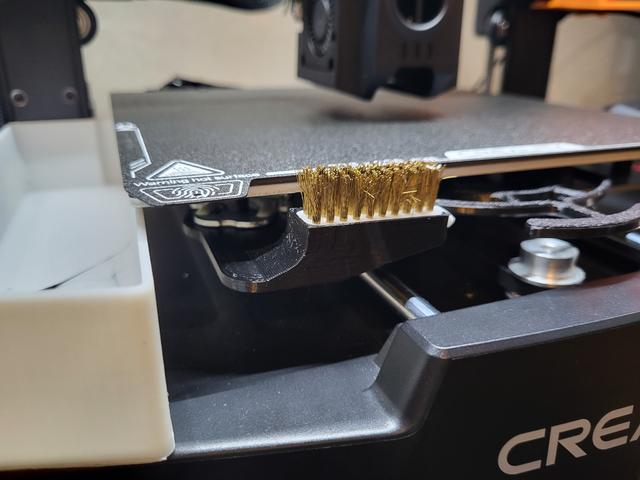
Ender 3 V3 KE/SE Auto Nozzle Cleaning Brush Mount
by Isaiah Tsoi · via Printables
| Format | STL |
| Category | Art |
| License | CC BY-NC-SA |
| Uploaded | Nov 25, 2024 |
⬇ 313 downloads
❤ 94 likes
👁 2.4k views
Description
Important Note Consider remove the brush when you run the built-in self testing or bed mesh calibration. The z-offset result may be affected If your brush is too “tall” and block the extruder during the process. Version supporting calibration is also available. Credit This is a remix model, taking the base from Ender 3 V3 KE Nozzle-Cleaning Brush Mount [UPDATED V2] and the mount from Ender 3 V3 KE and SE automatic nozzle cleaning brush. The thumbscrew design was inspired by funbart's creation. You can view their original design here . Changes With side storage and handle at the front, I am not able to use both of the designer on my printer, so i remix them to suit my need. The position of the brush is the same (or close to) the position of Ender 3 V3 KE and SE automatic nozzle cleaning brush. Other parts needed A M4 nut is needed for the thumbscrew. Gcode Please refer to the original post . Working with Bed Mesh Calibration (v3 update) As I want to keep the bed mesh calibration in my start gcode, so I lowered the mount (v3), and modify the gcode accrodingly. I am not really familiar with gcode, so I may have kept some unnecessary step here, but here for anyone who want need it for reference. SET_GCODE_VARIABLE MACRO=PRINTER_PARAM VARIABLE=fan0_min VALUE=30 ;compensate for fan speed SET_VELOCITY_LIMIT ACCEL_TO_DECEL=2500 ;revert accel_to_decel back to 2500 M220 S100 ;Reset Feedrate M221 S100 ;Reset Flowrate M140 S[bed_temperature_initial_layer_single] ;Set bed temp G28 X Y ;Home XY axes M190 S[bed_temperature_initial_layer_single] ;Wait for bed temp to stabilize G28 Z ;Home Z axis & load bed mesh BED_MESH_CALIBRATE PROBE_COUNT=6,6 ;Auto bed level M104 S[nozzle_temperature_initial_layer] ;Set nozzle temp G92 E0 ;Reset Extruder G1 X1 Y-18 Z3 F5000.0 ;Line up with brush M109 S[nozzle_temperature_initial_layer] ;Wait for nozzle temp to stabilize G1 X75 Y-18 Z-0.5 F5000.0 ;Wipe 1 G1 X30 Y-18 Z-0.5 F5000.0 ;Wipe 2 G1 X75 Y-18 Z-0.5 F5000.0 ;Wipe 3 G1 X30 Y-18 Z-0.5 F5000.0 ;Wipe 4 G1 X75 Y-18 Z-0.5 F5000.0 ;Wipe 5 G1 X30 Y-18 Z-0.5 F5000.0 ;Wipe 6 G1 X75 Y-18 Z-0.5 F5000.0 ;Wipe 7 G1 X30 Y-18 Z-0.5 F5000.0 ;Wipe 8 G1 X40 Y-18 Z15 F5000.0 ;Raise to clear brush G1 X-2.0 Y20 Z0.3 F5000.0 ;Move to start position G1 Z0.2 ;Lower nozzle to printing height G1 Y145.0 F1500.0 E15 ;Draw the first line G1 X-1.7 F5000.0 ;Move to side a little G1 Y30 F1500.0 E15 ;Draw the second line G92 E0 ;Reset Extruder
Originally published on Printables





