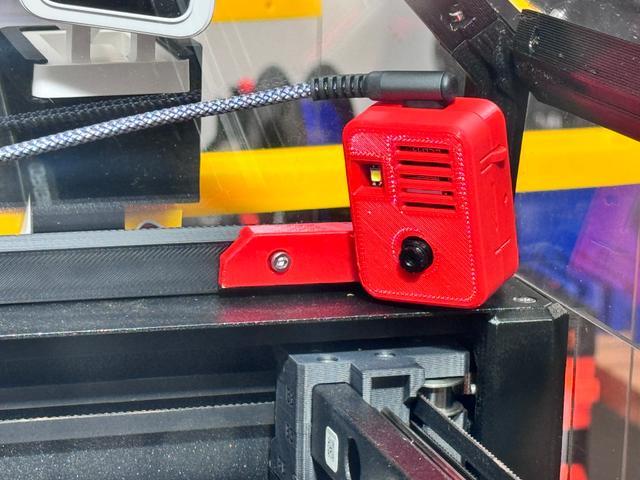
ESP32-CAM Mount for Prusa XL EnXLosure, with vents and USB-C compatible
by fuchsr · via Printables
| Format | STL |
| Category | Art |
| License | CC BY-NC-SA |
| Triangles | 14.5k |
| Uploaded | Dec 31, 2024 |
⬇ 84 downloads
❤ 16 likes
👁 790 views
Description
To mount an ESP32 Camera to the inside of the Prusa EnXLosure . This is a remix of Voxel3D's great original design, which didn't work for me as my ESP32-CAM module uses a USB-C cable and none of my cables fit through the cutout of the model. I also added some ventilation slots, to avoid heat collection from the module's flashlight. BOM ESP32-CAM module 1x M3 brass heatset insert (e.g., https://www.amazon.com/gp/product/B09MCWTBCC/) 1x M3x8 bolt Right-angle USB cable (e.g., https://www.amazon.com/gp/product/B088FSHMQ3/) USB charger Printing No special instructions. No supports needed. Installation (see original design ) Insert brass insert into the first hole on the inside of the front right corner of the EnXLosure “hat”. Place ESP32-CAM module into the Base component (camera oriented toward base and USB connector to the top). Push Front component onto Base Component to cover the ESP32-CAM. Install the assembled module in the front right corner of the EnXLosure “hat” using the M3-8 screw. Insert the USB cable and route it along the right side of the EnXLosure and out the rear. ESP32-CAM Software Can be found here . This was my first time using an ESP-32, and I found the instructions for flashing the module and connecting it to PrusaConnect to be straightforward. Make sure Hmirror and Vflip are turned on to get the correct orientation. If you like what I'm doing… … consider buying me a coffee or joining my Club .
Originally published on Printables





