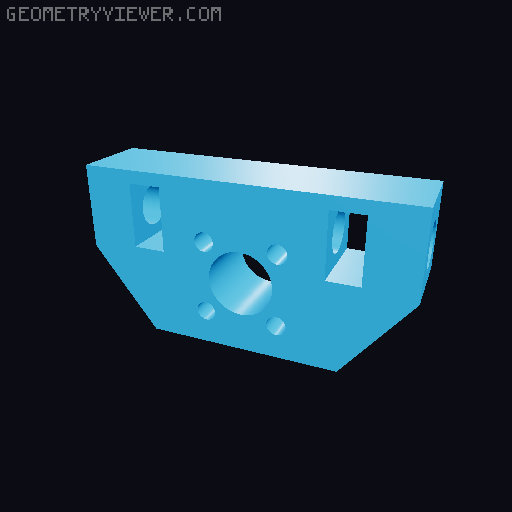
Field Camera conversion for Vega 4x5 with double rear fork
by Koraku · via Printables
| Format | STL |
| Category | Gadgets |
| License | CC BY-NC-SA |
| Triangles | 4.6k |
| Uploaded | Jan 20, 2025 |
⬇ 61 downloads
❤ 11 likes
👁 498 views
Description
This is a remix from the Vega 4x5 camera that you can find here : https://www.printables.com/fr/model/236655-vega-4x5-view-camera/remixes You cannot realise this project without the majority of the part from the original model Parts list : This part list is only for the modification, refer to the original model for the part list of the original parts, parts (such as bolt and nuts) might be reused for this mod. All the part for the Vega 4x5 Camera excluding the sliders and the tripod mounts make sure you have 7 knobs with nuts (not included in this part list.)* All the stl in the STL_support folder* 2 MGN9H rails 300mm lenght (for instance : https://www.ebay.fr/itm/314852402197?var=613368452661) 1 T8 threaded 300mm lead screw WITH the attachement , brass nut and the coupler** (for instance : https://www.ebay.fr/itm/273417692165?var=572799828728 ) 2 M6x30mm hex head bolt 1 M6x40mm hex head screw*** 2 M6x50mm hex screw 14 M6 nuts 3 M5x12mm bolt with appropriate nuts and washers if you use the 200PL-14 manfrotto quick release plate**** 4 M5x16mm bolt with appropriate nuts and washers***** 6 M3x16mm rounded head bolt with appropriate nuts and washers 12 M3x10mm round head bolt At least 500mm of M6 threaded rod that will be cutted later Some thick paper (optional) A bit more of the rubber band that you used to attach the glass holder A 300*180*8mm piece of plywood (some store cut them for you) A finish for the plywood, I used walnut ink and semi-mat laquer (optional but prettier) *if you don't want the double fork and haven't printed the camera yet you will have to print the original fork and rear standard. if you want the double fork you will have to print the newfork and newrearstd in STL_newrear !!! **I used the set screw of the coupler to attach my knob, feel free to not order a coupler if you already have a set screw or if you wish to make the knob differently ! ***This one is for the new fork if you don't plan to use the new fork replace this one with a 30mm bolt **** I used a of the shelf 200PL-14 manfrotto plate that i bolted to my plank you are free to experiement with other attachement method but bolting the plate has been very relieable in my experience. If you use an other type of plate please try to measure out your holes and source the hardware accordignly) ***** These are for the T8 lead screw, if somehow your attachement system differs from mine please choose appropriate screws Printing recommendation : Use the same setting as for the rest of the camera parts from the original model. Be sure to check the file before printing if they seem wierd or you are not sure → Contact me i will answer as quickly as possible! Print in a orientation that minimize overhang. Instructions : These instructions only refer to the modification, if you require instruction for the other parts of the camera refer to the original model! Instructions are the same wether you use the original fork or the new dual fork. Assembly for the dual fork is very simple : Slide the new rear standard into the fork and then feed the screw through the standard and the fork, then bolt the knobs on. 1. Printing IF YOU WANT THE DOUBLE FORK : Print ALL stl IF YOU DO NOT WANT THE DOUBLE FORK : Print all EXCEPT newrearstd and newfork All the part must be printed exactly once except the washers you will need 2 2. The plywood Start by drilling the holes in your plank using the measurement provided in the plank.pdf file. Remember measure twice (or more) drill once ! It can be adventageous to make the rail a lead screw hole a tiny bit langer for adjustement The part of the plywood where the 6mm holes are located will be refered as "the back" The four holes in the middle are intentionally left without exact measurement they are for the mounting plate. You can choose where you want to place your mounting plate/mecanism. Just make sure it's width-wise centered and not too far in the front. I personaly took my plate and simple drew the holes on the wood through it. You should also apply your finish at this point and let it fully dry before continuing. 📷 Image redacted — claim this model to add your own media 3. Mouting plate Mount your plate to the the plank be sure to use the washers on the top side. 📷 Image redacted — claim this model to add your own media 📷 Image redacted — claim this model to add your own media Notice here i had to file a bit of the top of the screw to make sure the front assembly could go over without touching them 4. Rail an screw Mount each rail on each side here i only used 3 screw per rail but you can use all of the holes if necessary. Be sure to place one washer between the rail and the plank to elevate it slightly. 📷 Image redacted — claim this model to add your own media Mount the screw in a similar maner but do not place a washer between the screw mount and the plank leave a bit of the screw toward the back to attach the knob 5. Rear support Using 2 30mm and 1 40mm bolt mount the rear support to the plank between the rails. You can also mount the knob. Be sure that the 40mm bolt is the one poiting up this one will be used to attach the fork. Use washers on the underside of the plywood for the nuts 📷 Image redacted — claim this model to add your own media 6. Front support First mount the screwattachement to the brass bolt on your screw Then attach the support legs to the rails with the M3x10mm bolt make sure the curvy part of each leg is facing AWAY from the rear support. 📷 Image redacted — claim this model to add your own media Then cut 2 times 80mm from your M6 rod and using 6 nut attach the legf to the center part: Put 1 nut on the middle of the cutted rod Slide it through one leg until the nut is seated Insert 2 nut in the hold of the center piece Screw the nuts on the threaded rod Screw the threaded rod into the center piece Screw the 2 nut of the rod into each side (one on the leg one of the center piece, see picture) Do the same on the other side. 📷 Image redacted — claim this model to add your own media At this point use the nuts to adjust the assembly. It should not be too wably but also should move without too much effort when turning the screw. Do not tighten too much the assembly should move freely when turning the screw. Take the front support plate and pass 1 M6x30mm bolt through. your front standard will attach there. Then using 4 M6 nuts make two group and pass the 2 nut group into the square holes. The hole of the nut should align with the hole on the side of the piece. 📷 Image redacted — claim this model to add your own media 📷 Image redacted — claim this model to add your own media Take the previous assembly and the front support plate. Slide the plate between the leg of the assembly and make sure the offcentered hole on the plate are aligned with the slots of the legs. 📷 Image redacted — claim this model to add your own media Take 2 M6x50 bolts and pass them through the holes of the leg and screw them into the bolt located in the plate. 📷 Image redacted — claim this model to add your own media Make sure to not tighten the bolts too much the part should move with a bit of effort and stay in place. In case you don't have enough friction or the part are too far appart from one another place some piece of papers between the legs and the plate. 📷 Image redacted — claim this model to add your own media Cut arround 250mm of the M6 rod and slide it through the slot of the legs and the excentric hole in the plate. Make sure to somewhat make it center. 📷 Image redacted — claim this model to add your own media Take 2 knobs and the 2 3d printer washers and tighten the rod between the leg, the plate should become harder to rotate. 📷 Image redacted — claim this model to add your own media 7. Mounting the Camera Take your camera assembly and use the elastic to pack it together. 📷 Image redacted — claim this model to add your own media Rotate the screw until the support assembly is entirely back. 📷 Image redacted — claim this model to add your own media Mount the camera on the supports using 2 more knobs. 📷 Image redacted — claim this model to add your own media Usage : If your camera is in the state after the instruction, remove the elastic and place your lens. You can now use your camera. Turn the knob on the screw to adjust focus. To pack it : Bring the front and rear together Place the additional support in the front standard and put the elastic arround the whole assembly 📷 Image redacted — claim this model to add your own media Unscrew the knob from the rear standard fork Untighten the front support side knob until you can move the front standard Gently pivot the front standard while removing the rear standard and its fork from the support Once completly horizontal tighten the knobs again To open follow the procedure backwards ! My camera doesn't slide smoothly ? → loosen the rail screw and the front support knobs and slide the camera back and forth. Then retighten the rails. → Adjust the screws that connect the support legs to the screw attachemet Do I need to oil the mecanism ? I personnaly used a bit of chain oil that I had on hand but I don't think it's mandatory CONGRATULATION now you've completed the camera conversion ! Any question please feel free to comment or DM me ! If somehow I've made a mistake in the files please contact me. Please leave me feedback if instruction unclear or if i should add something
Originally published on Printables





