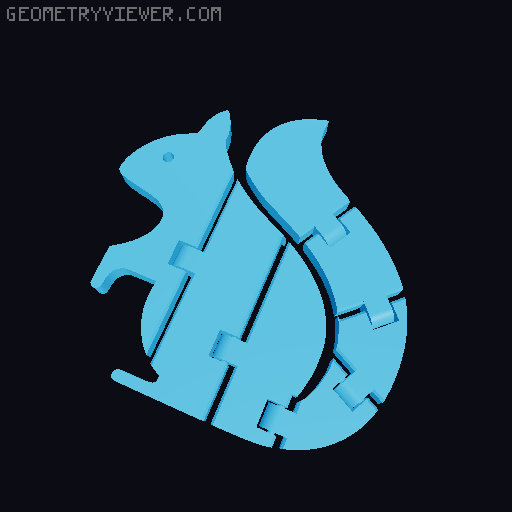
Flexifier: flexi 3D models generator (print-in-place)
by Lucandia · via Printables
| Format | STL |
| Category | Other |
| License | CC BY-NC-SA |
| Uploaded | Jan 9, 2024 |
⬇ 2.2k downloads
❤ 1.0k likes
👁 18.5k views
Description
Make it flexi! Design a print-in-place custom flexi 3D model from an image with the Web App or Python script! Download the ZIP file with the app executables and run the one for your operative system! (The executable file will open the Web App in dedicated browser window) Or you can find the Web App link and info in the Github Readme file. (GitHub page: https://github.com/Lucandia/Flexifier ) Export STL or STEP You can choose the output format between STL and STEP. You can choose the hinge parameters Height of the model Add or remove a Hinge Hinge position and rotation Hinge diameter Hinge thickness Thickness and length of the cut in the image Hinge type supported Normal hinge Ball joint Tips Once clicked on a slider pointer, use arrows to move precisely Using the model height as the hinge diameter maximizes the strength of the connection Ball joints allow a 360° rotation between the two joint parts Ball joints fold like a regular hinge when the “Expose ball joint” option is on To free the ball joint after printing, slightly push the spheres. Select “Number” in the “Interface” selectbox (top right) to have full control over the input You can download an example model from this page. The Openscad module used is available in the files. The original code is maintained on GitHub (https://github.com/lmonari5/Flexifier.git). Let your imagination run wild! Enjoy! Luca I am a student who enjoys 3D printing and programming. If you want to support me with a coffee, click here! Stay Tuned Next steps: Add a greyscale threshold for complex images. Updates Added ball joint (18/06/2023) Added hinge diameter control; updated the preview to show the full hinge size (19/06/2023) Added expose ball joint option; added cut chamfer in a ball joint; improved slider ranges thanks to Cadquery bounding box (22/06/2023) Decreased memory usage (26/06/2023) Improved preview to be more lightweight, change rendering program to CadQuery, allow export STEP format (03/06/2023) Started the transition from the Web App interface to the Desktop App interface (09/01/2024) DISCLAIMER: Due to the high number of users and the size of STL files, the app usually exceeds the resource limits. I check it and reboot it periodically. If the Webb App doesn't work and I have not rebooted it yet, you can: download the GitHub repository ( https://github.com/Lucandia/Flexifier ) and run it locally (Streamlit documentation: https://docs.streamlit.io/library/get-started); fast rendering use the OpenScad Module directly; slow rendering Web app errors/bug If you encounter any error or bug, let me know! Try the OpenScad module: Generate a hinge in a model from your svg, import the module and try: difference(){ linear_extrude(height = HEIGHT) // extrude the svg translate(v=[X_TRAN,Y_TRAN,0]) // translate the svg image rotate(a=[0,0,Z_DEG]) // rotate the svg image scale([X_SCALE,Y_SCALE,1]) // scale the X and Y axis of the svg import(file = "YOUR_PATH/YOUR_FILE.svg", center = true); translate([X_TRAN_HINGE,Y_TRAN_HINGE,0]) rotate([0,0,ROTATE_HINGE]) diff_hinge(HEIGHT_HING, hinge_h_thick=HINGE_THICKNESS, break=CUT_THICKNESS, break_len=CUT_LENGTH); }; translate([X_TRAN_HINGE, Y_TRAN_HINGE,0]) rotate([0,0,ROTATE_HINGE]) uni_hinge(HEIGHT_HINGE, hinge_h_thick=HINGE_THICKNESS, break=CUT_THICKNESS); Replacing the capital variables with your values. The same approach can be used for the ball joint, using diff_ball and uni_ball instead of diff_hinge and uni_hinge : diff_ball(HEIGHT_HINGE, ball_diam=BALL_DIAMETER, break=CUT_THICKNESS, break_len=CUT_LENGTH, expose=true); uni_ball(HEIGHT_HINGE, ball_diam=BALL_DIAMETER, break=CUT_THICKNESS);
Originally published on Printables





