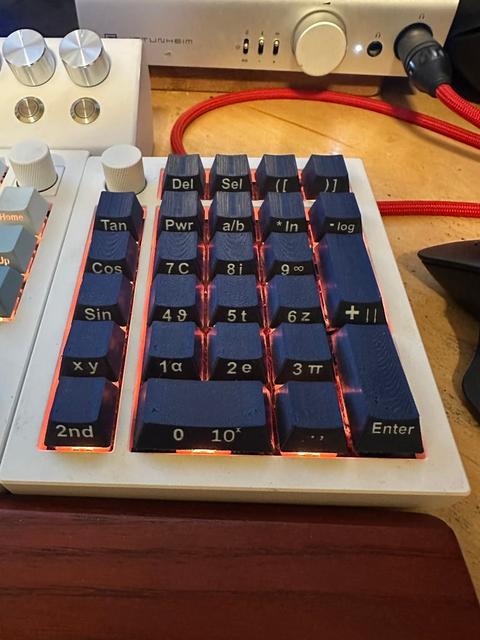
Fully Parametric Key Cap Model with Mass Export Script
by QHess · via Thingiverse
| Format | STL |
| Category | Gadgets |
| License | CC BY-SA |
| Triangles | 2.0k |
| Uploaded | Mar 12, 2026 |
⬇ 65 downloads
❤ 2 likes
👁 162 views
Description
The files included are just for testing what stem tolerance you need to print these first so to insure the press fit works properly. Full project is on google drive, and it includes STLs for many variations of the key caps. https://drive.google.com/drive/folders/1bquWg2KeKy1-W_aPqhSFzhTO44Xc3Eru?usp=sharing Scripts CSVs and .f3d files also on github. https://github.com/qrhess/ParametricKeyCaps . It is a system that allows you to easily define, export, and share key cap designs. With scripts to work the designs with them and produce all of your STLs without human input. Load it up in fusion an play with it. The main script is STL_Mass_Export.py it is in charge of producing STLs of your key caps. It will ask you for three CSVs parameters, heights, and a batch. The parameters CSV optional, and is the initial setup of your model you can load a single set of parameters or sweep across sets of parameter values to generate many similar models. The Sweep_Parameters.csv file is an example of how it's formatted for sweeps and the top legend key caps were generated using it if you want an example of what the output looks like. The Initial_Parameters.csv includes all of the parameters already built into the model that you can play with. The heights CSV is also optional. The parameters in this file will be loaded when the Suffix columns match between this and your batch file. In its current setup it only handles the heights but it can handle more if you want it to. The batch file is required and is the most important file. It will include your primary and secondary legend for the key cap, as well as parameters you want to apply to single key caps. The logic in the script will automatically apply primary legend to Legend1 if there is no secondary legend and to Legend2 if there is. Secondary legend if filled out will be applied to Legend3. I also included Parameters_Export.py so you can easily store the values that you have set for a model. This could be used to easily share different styles of key caps if you wanted to. Parameter_Load.py is more of a diagnostic tool, if one row is loading wrong this will let you load that row and see why.
Originally published on Thingiverse





