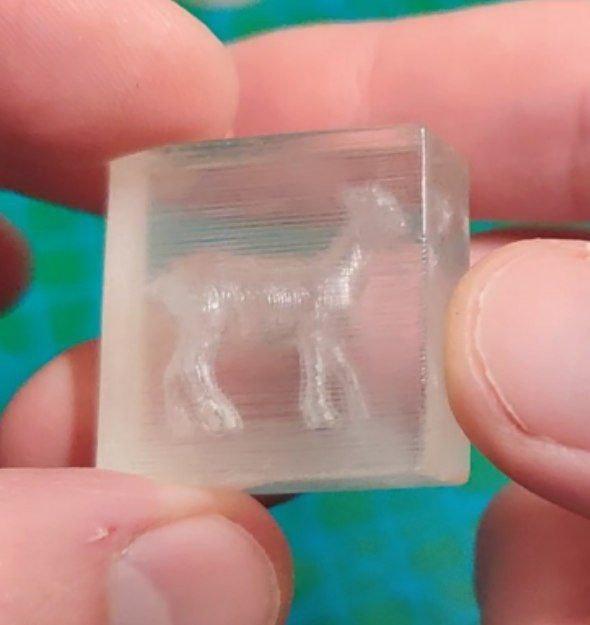
How to print "holograms" inside "glass"
by heyroman · via Printables
| Format | STL |
| Category | Other |
| License | CC BY |
| Triangles | 734 |
| Uploaded | May 2, 2025 |
⬇ 224 downloads
❤ 217 likes
👁 6.8k views
Description
See more details and a video of the effect in my reddit post . Disclaimer: yes, I know this aren't actually holograms =) Instructions below are based on OrcaSlicer, I haven't tried this in other slicers. Necessary modifications to the original “how to print glass” method: take the model you want to make into a “hologram” and add it to the slicer add a primitive (cube, cylinder, disk) to the buildplate, scale it to be bigger than the model select both object and click “assemble” now move the original object (that is now a part of the assembly) to the center of the primitive - as it is now part of the assembly it won't snap to buildplate right-click on the object and select “change type” - “ negative part ” (optional) go to “Strength” and set wall loops to 1 IMPORTANT go to “Strength” - “Advanced” and uncheck “Detect narrow internal solid infill” For tests you can skip first 4 steps by using my STL - it's a cube with a cone inside. After printing my quick and risky method of making all sides clear is: lightly sand all the walls so that layer lines aren't as protruding use a blowtorch (or a torch-like lighter) to quickly melt the outer layer. Be careful not to burn the plastic! 100% sure that proper sanding+polishing or UV-resin coating will give better results and be less risky, but I haven't tried it yet cause I hate sanding and don't have any UV resin =)
Originally published on Printables





