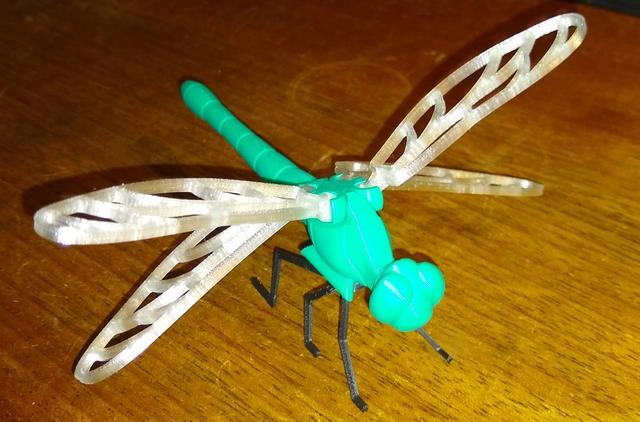
Legs for Voronoi Dragonfly
by Gigabeast · via Printables
| Format | STL |
| Category | Art |
| License | CC BY-NC-SA |
| Triangles | 1.9k |
| Uploaded | Jan 24, 2024 |
⬇ 171 downloads
❤ 25 likes
👁 683 views
Description
The legs are rather delicate so they're in proportion with the dragonfly. I printed mine at 10mm/s for the 1st layer to really get it nailed down, then 60mm/s is fine for the rest of the layers. I used “initial layer line width” of 100% instead of the usual 125% because I have a tight Z-offset for tricky items and it can result in a slight edge to trim off, and that would be difficult on delicate legs. I used 0.2mm layers (0.25mm 1st layer as usual) and a 4mm nozzle, you could print it with thinner layers if you like but 0.2mm worked ok for me. I used Elegoo black PLA+ so any material should do the trick. Print the parts as arranged in the STL. Each part has one flat face so that's on the print bed, no supports needed, and if you print the first layer slowly you shouldn't need adhesion (which would be difficult to remove without damaging the legs) After printing, arrange the legs and mounting plate as I have in the picture, with the mounting plate leaning towards you and prong-downwards, four of the leg tips towards you and two pointing away. That should all be the right way around for glueing. Then the fiddly bit, fit the tab of one set of legs into the mounting plate's slot. The tab is angled so that the legs don't come down straight which would make them too close together. Once you have the tab in position, put a drop of superglue on it and squirt it with accelerator if you have some. Then add the other set of legs. If the legs are a loose fit you'll have to hold them or prop them up while the glue sets - mine are just tight enough to hold themselves in position for the drop of glue. Once you have the legs on the mount, the mount just pushes into the hole in the dragonfly body and your dragonfly is complete :o) If you want to remove the legs again later, insert a small flat screwdriver blade under the mounting plate from the head end of the dragonfly and carefully ease out the mounting plate.
Originally published on Printables





