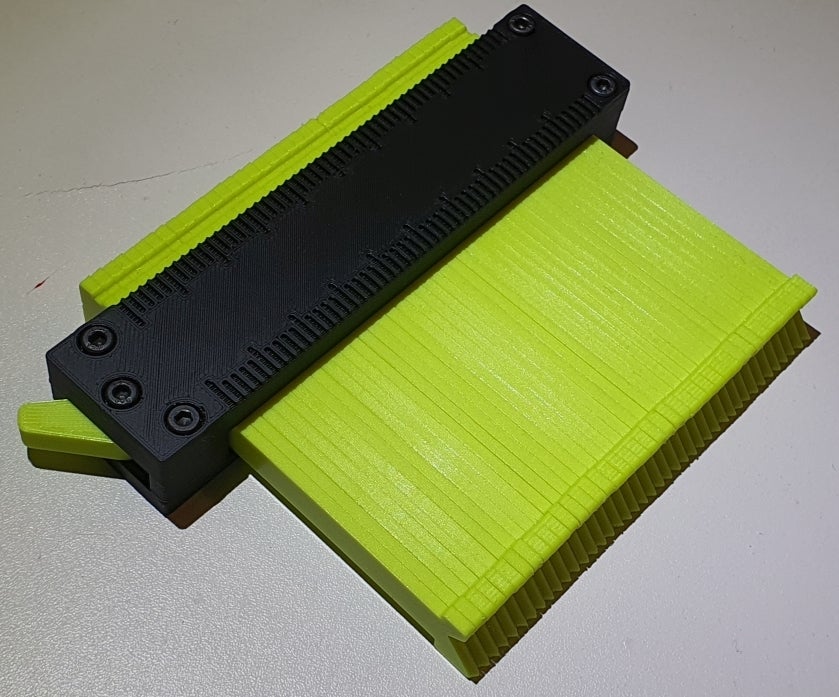
Lockable Contour Gauge
by Tjalf · via Printables
| Format | STL |
| Category | Tools |
| License | CC BY |
| Triangles | 17.5k |
| Uploaded | Dec 26, 2022 |
⬇ 3.6k downloads
❤ 1.2k likes
👁 20.1k views
Description
A lockable contour gauge to copy/measure arbitrary shapes by pushing the blades against the desired shape and locking the gauge. The shape of the gauge can then e.g. be photographed and uploaded into a 3D CAD program. I used this for example to measure the shape of my nose in order to design a custom, 3D printed FFP2 nose clip which replaces the flimsy metal clip and perfectly seals the mask. No more foggy glasses! ######## Comments: The measurement range is ~100x50 mm (WidthxDepth). The gauge consists of 5 printed part models: Frame 1, Frame 2, Spring, Lever, Blade The scale on Frame 1 is in steps of 2 mm and designed for a 0.4 nozzle with 0.45 mm line width (thickness 0.9 mm, two lines). There is an option without the scale too (Frame_1_blank). Frame 2 comes in two options, one where the screws are self-tapping into the printed plastic (Frame_2_selftap) and the other with insertion holes for M3 nuts (Frame_2_nuts) Each blade is 2.4 mm thick with the option of a flat tip (Blade_Flat) or a chamfered one (Blade_Sharp). The blades can be locked with a lever on the side. It is not a hard lock - it just increases the amount of friction between the blades using a spring, so they don't move without applying a considerable force. ######## Hardware you need: 5x M3x16 1 M3 nut (5 pcs. if Frame_2_nuts is used) Some sticky velours or similar What to print (Standard version): Frame_1_Standard Frame_2_Nuts_Standard Spring Lever 41x Blade_Sharp ######## Tips and order of printing for best results of the mechanism: First, print all blades (41 pieces for standard version): Print the blades with the wide side laying flat on the heatbed. I print them with 100% infill and PLA to maximize their stiffness - which avoids annoying bending when measuring sharp corners. To avoid bulging of filament on the top surface of the blades and to stack the blades more precisely, reduce the filament flow of the top most layer. For example, add the GCode M221 S90 (90 % extrusion factor) to the top most layer Measure the width of the blade stack. The design value is 100.8 mm, which includes a design gap between each blade of 0.06 mm. The frame includes an additional 0.5 mm design gap between the frame wall and the wide side of the last blade to adapt for slight deviations of the stack width. That is a total opening of the frame of 100.8 mm + 0.5 mm where the stack must fit. If you see visible gaps between the blades, try to grind away bulging spots on the blade surfaces - they usually are at the ends. This decreases the stack width and also prevents bending of the blades when you lock the stack. In case the deviation of the measured stack width is too large, adapt the overall length of both frame parts by slighty scaling it in the slicer (should be fine for a few percents), according to your measured stack width. Second, print Frame_1 and Frame_2. Third, print the spring: Use a material that does not crack under tension/stress - like cheep PLA versions tend to do. Avoid materials that creep. Use PETG for example. Adapt the spring width by scaling it in the slicer until it fits perfectly between the lever and the blade stack. This way you can also define the locking strength. Fourth, there is 0.7 mm clearance between the top of the blade stack (thin side of one blade) and Frame 1. Attach some sticky velours, cloth or similar to Frame 1, so the blades experience some sort of smooth friction. Fifth, you can also attach a piece of velours or similar to the spring, at the contact point with the blades, to improve friction. Updates: Added frame 1 and 2 for increased length of total free blade space of 151.7 and 202.1. This corresponds to either 63 or 84 pieces of 2.4 mm wide blades Added a lever with 2 mm instead of 1 mm long locking knob. This should help to give more freedom between a loose blade stack and a locked blade stack. Exchanged the self-tapping holes in the bottom plates with nuts for more reliable joints. Added bridging structures in each hole which originally required supports to be printed properly. With the new structures, supports can be switched off entirely!
Originally published on Printables