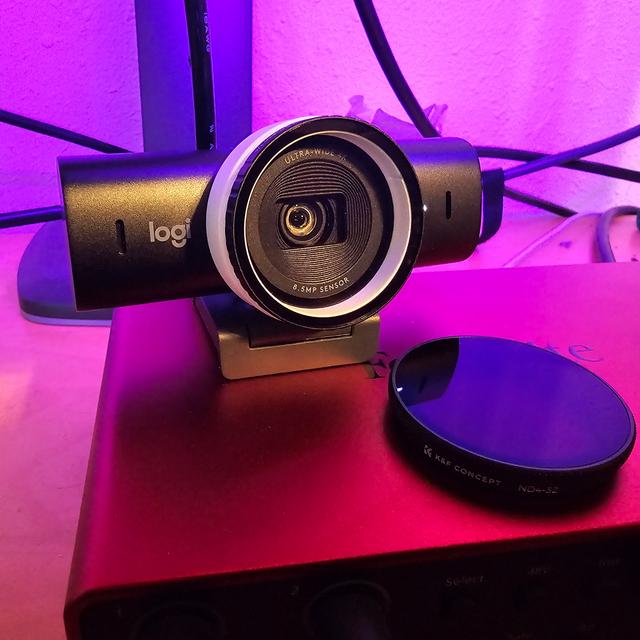
Logitech Mx Brio Webcam DJI Osmo Action 6 Filter Adapter
by MyBritishComputerGuy · via Thingiverse
| Format | STL |
| Category | Mechanical |
| License | CC BY-NC |
| Triangles | 2.2k |
| Uploaded | Mar 8, 2026 |
⬇ 14 downloads
👁 49 views
Description
This adapter lets you mount (specifically) a K&F Concept Snap-On filter to the Logitech MX Brio webcam, giving the camera a creative option it simply doesn’t have out of the box. I'm using it with the Black Diffusion 1/4 filter, which is used a lot in content creation. I printed in White so you could see the thing better, my final output was done in Matte Black PLA. 25% infill on Draft settings, sliced in Prusa Slicer, no supports required. One of the biggest limitations of the Logitech MX Brio is that it has no built-in filter mounting system. This adapter solves that problem by allowing you to use snap-on filters designed for the DJI Osmo Action 6, opening the door to a much wider range of visual styles and creative possibilities. While I specifically designed and tested this adapter with the K&F Concept Snap-On Black Diffusion 1/4 filter, it should also work with other snap-on style filters made for the DJI Osmo Action 6. That means you’re not limited to just one look — you can experiment with different filter types to get the image style that works best for your setup. With the Black Diffusion 1/4 filter attached, you can soften the image slightly, reduce harsh digital sharpness, and create a more flattering, cinematic look for streaming, video calls, content creation, and recording. This adapter is a simple way to expand the capabilities of the MX Brio and make it more versatile for creators who want more control over their final image. I have included an affiliate l to the filter set here >>>> https://amzn.to/4bwKBlK Please note: the link above is an affiliate link, which means I may earn a small commission if you make a purchase through it, at no extra cost to you. If you want to see the effect of this filter in action head over to my YouTube channel and check out some of my livestreams. https://youtube.com/@MyBritishComputerGuy As the thing is quite thin in places I went ahead and just did a 75% infill, I really don't think this matters much though you could probably use the defaults. I did ena
Originally published on Thingiverse



