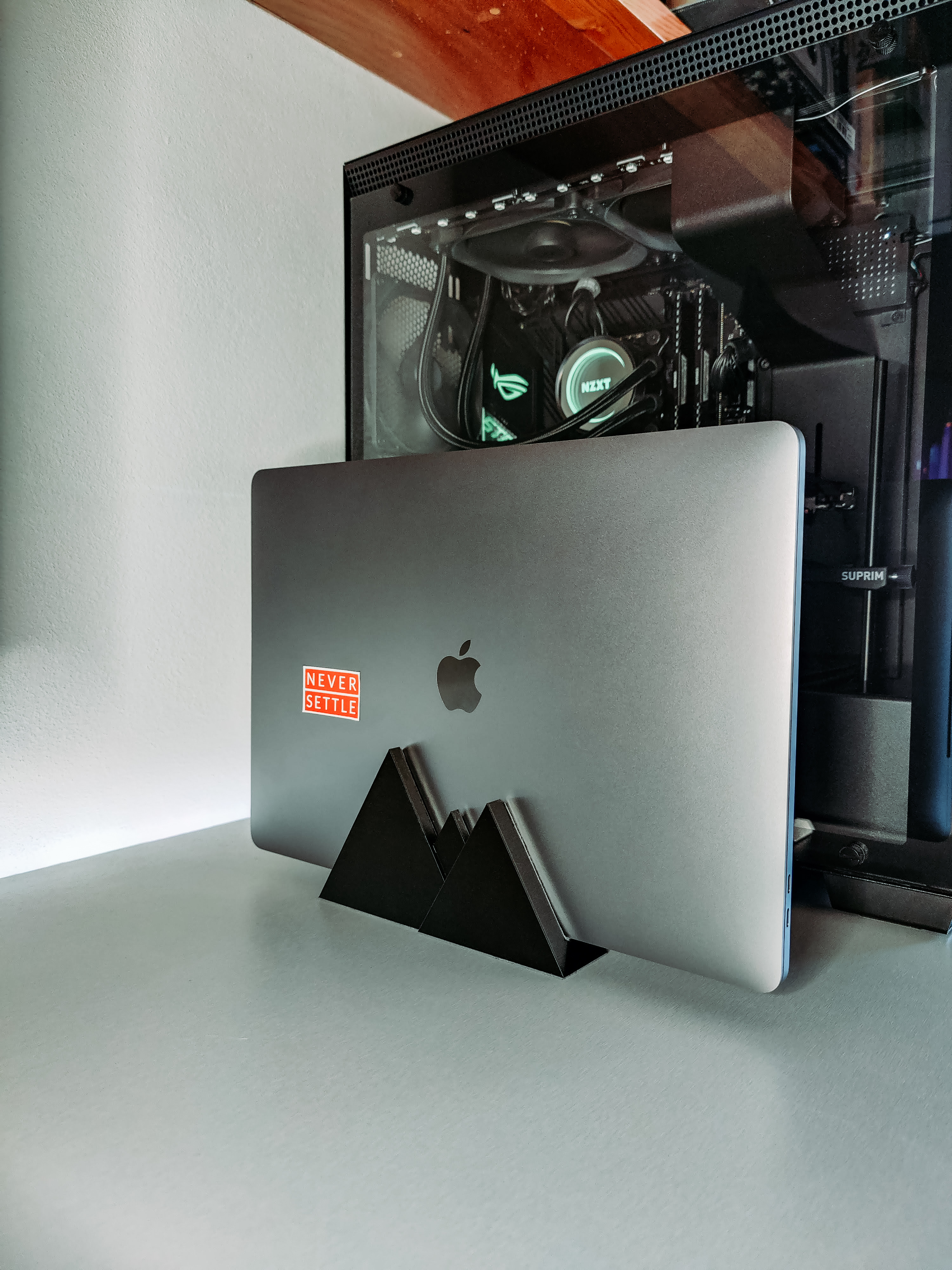
MacBook vertical stand
by Celta · via Printables
| Format | STL |
| Category | Gadgets |
| License | CC BY-NC-SA |
| Triangles | 194 |
| Uploaded | Feb 1, 2023 |
⬇ 2.7k downloads
❤ 512 likes
👁 19.5k views
Description
Vertical stand for MacBook with holes for ventilation. I found giahuy2201 's model but I noticed that it was missing holes for ventilation. So I added holes on one side for better ventilation and hole design matching the entire piece. Printing When printed at 100% on all axis, the clearance on the slot is 18.26mm, so that is the maximum thickness of the laptop (again, at 100%). If another dimension is needed, bigger or smaller, the model can be scaled on one axis. I use it for a MacBook Pro 16'' 2019 that is 16.2mm and added two 1mm adhesive foam sheets, one for each side, that added to approximately 18.2mm so it has an almost tight fit. Scaling Method 1 (New, requires PrusaSlicer >2.6.0) Since the release of PrusaSlicer 2.6.0 alpha 2, a new tool is available, the Measurement tool, that allows us to scale the model very easily. With the model imported on the slicer, select it and select the icon for “measure” on the left. 📷 Image redacted — claim this model to add your own media Select both the left and right inside faces of the model 📷 Image redacted — claim this model to add your own media A good dimension for the laptop gap is (laptop thickness + tolerance x 2). Around 0.15mm tolerance should be good. With the math done, input the value and click “scale”. Method 2 (Old) Scaling can be a bit challenging using the Slicer since we only get the outer dimensions of the object, however, we can use Math to solve this issue first. Since we know the inner dimension at 100% is 18.26mm, we only need the thickness we desire. 📷 Image redacted — claim this model to add your own media Let's say we want to resize the piece to use on a laptop with 15mm and a press-fit (no space left), using the "rule of three": 📷 Image redacted — claim this model to add your own media Or we can use an online Rule of Three Calculator : 📷 Image redacted — claim this model to add your own media The outcome in this scenario is 82.15, but wait! ⚠ Don't forget to account for printer tolerances, quoting Mikolas Zuza in The Surprising Practical Uses of Color Change in PrusaSlicer , “ 0.15 millimetres in every direction should be enough.” So to the 15mm, we would add 2 times 0.15mm, giving the final dimension of 15.3, let's update the rule: 📷 Image redacted — claim this model to add your own media The adjusted outcome in this scenario is 83.79, so we would change the scale on one axis to the value of 83.79%: 📷 Image redacted — claim this model to add your own media Et voilà, we have the object sized according to our needs. Scaling TL;DR Find the dimension of your laptop (MacBook size list below). See if you want a tight fit or have some gap space between the laptop and the object. ⚠ Account for printer tolerances (usually 0.15mm is a good start, double it to account for both sides). Add it all and use the rule of three with the values we already know from the object, 100% represents 18.26mm, and X% should mean (laptop height + gap + tolerances)mm. Adjust the scale in the slicer on only one axis. MacBook height sizes 2021 MacBook Pro (14-inch, 2021) - 15.5mm MacBook Pro (16-inch, 2021) - 16.8mm 2020 MacBook Air (M1/Retina, 13-inch, 2020) - 16.1mm MacBook Pro (Intel, 13-inch, 2/4 Thunderbolt ports, 2020) - 15.6mm MacBook Pro (M1, 13-inch, 2020) - 15.6mm 2019 MacBook Air (Retina, 13-inch, 2019) - 15.6mm MacBook Pro (13-inch, 2/4 Thunderbolt ports, 2019) - 14.9mm MacBook Pro (15-inch, 2019) - 15.5mm MacBook Pro (16-inch, 2019) - 16.2mm 2018 MacBook Air (Retina, 13-inch, 2018) - 15.6mm MacBook Pro (13-inch, 2018) - 14.9mm MacBook Pro (15-inch, 2018) - 15.5mm 2017 MacBook (Retina, 12-inch, 2017) - 13.1mm MacBook Air (13-inch, 2017) - 17mm MacBook Pro (13-inch, 2/4 Thunderbolt ports, 2017) - 14.9mm MacBook Pro (15-inch, 2017) - 15.5mm 2016 MacBook (Retina, 12-inch, Early 2016) - 13.1mm MacBook Pro (13-inch, 2/4 Thunderbolt ports, 2016) - 14.9mm MacBook Pro (15-inch, 2016) - 15.5mm 2015 MacBook (Retina, 12-inch, Early 2015) - 13.1mm MacBook Air (11/13-inch, Early 2015) - 17mm MacBook Pro (Retina, 13/15, Early/Mid 2015) - 18mm 2014 MacBook Air (11/13-inch, Early 2014) - 17mm MacBook Pro (Retina, 13/15-inch, Mid 2014) - 18mm 2013 MacBook Air (11/13-inch, Mid 2013) - 17mm MacBook Pro (Retina, 13-inch, Early 2013) - 19mm MacBook Pro (Retina, 15-inch, Early 2013) - 18mm MacBook Pro (Retina, 13/15-inch, Late 2013) - 18mm 2012 MacBook Air (11/13-inch, Mid 2012) - 17mm MacBook Pro (13/15-inch, Mid 2012) - 24.1mm MacBook Pro (Retina, 13-inch, Late 2012) - 19mm MacBook Pro (Retina, 15-inch, Mid 2012) - 18mm 2011 MacBook Air (11/13-inch, Mid 2011) - 17mm MacBook Pro (13/15-inch, Early/Late 2011) - 24.1mm MacBook Pro (17-inch, Early/Late 2011) - 25mm 2010 MacBook (13-inch, Mid 2010) - 27.4mm MacBook Air (11/13-inch, Late 2010) - 17mm MacBook Pro (13/15-inch, Mid 2010) - 24.1mm MacBook Pro (17-inch, Mid 2010) - 25mm 2009 MacBook (13-inch, Early/Mid 2009) - 27.5mm MacBook (13-inch, Late 2009) - 27.4mm MacBook Air (13-inch, Mid 2009) - 19.4mm MacBook Pro (13/15-inch, Mid 2009) - 24.1mm MacBook Pro (17-inch, Early 2009) - 24.1mm MacBook Pro (17-inch, Mid 2009) - 25mm 2008 MacBook Pro (15-inch, Late 2008) - 24.1mm MacBook Pro (15/17-inch, Early 2008) - 25.9mm Source: support.apple.com Credits Clamshell Macbook stand by giahuy2201
Originally published on Printables





