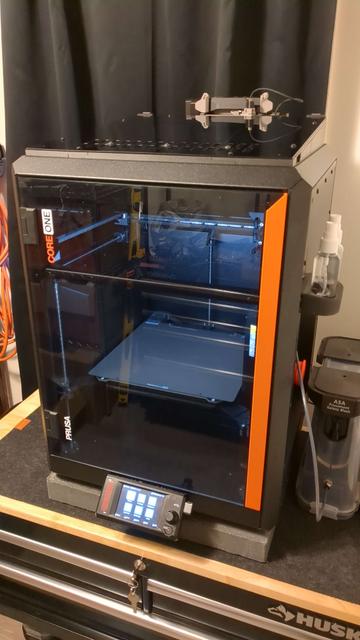
MMU3 CORE One mod with sleek hinged top cover
by DrinkyCrow · via Printables
| Format | STL |
| Category | Art |
| License | CC BY-NC-SA |
| Triangles | 10.6k |
| Uploaded | Dec 10, 2025 |
⬇ 65 downloads
❤ 20 likes
👁 543 views
Description
This model was made specifically for me to my preferences, I'm uploading it in-case it can be of use to someone. Thank you to the original modelers and remixers, please go check them out. I loved the minimal look and easy access of the originals but disliked how noticeable it was that they were two distinct models clearly not designed with the other in mind. I attempted to remedy that and fixed a few personal annoyances I came across in the process. Notable changes Recessed the Lid Frame into the wall about 5mm for a sleeker look. This removed the front wall parts and required the angling of the front frame parts Added a Lip recessed around the Lid Frame to hide gaps between the frame and wall parts. Sometimes the frame parts would not print completely flat and would bow, I simply didn't like how it looked. I also feel this helps keeps warm air in the chamber but that wasn't its original purpose nor have I tested it. Added a Lid Stopper to the Wall Hinges. Over time I noticed the hinges became looser and the lid would start resting on the MMU when open, I sometimes print with the lid open and wanted to prevent that from becoming an issue. Split the Frame Rear Left and Right with Hinges into two parts. To get the most strength out of the hinges, I would have to print them in a vertical orientation that would leave part of the frame portion weak and prone to warping. Splitting them in two made them much easier to print without sacrificing the part strength I was after. Replaced self taping holes and heat set inserts with square nuts. The frame parts kept stripping out on the test models and frustrating me so I replaced them with the same square nuts that the wall parts already used. Changed the rear wall left/right heat sets to the same for uniformity's sake. Added two screw holes for holding down the slider cover. I kept opening the lid using the slider like a handle and popping the slider cover off, it annoyed me enough to add the screws. The original clips are as they were so the screws are optional. Additional minor changes were made to accommodate the above. Optional Parts Frame Front Center with Slider and Frame Front Slide Cover I started making this model with the intention of using the original vent slider but with the 6.4.0 firmware update for the Core one I swapped to using the automatic vent feature. If you prefer the manual slider, swap Frame Front Center noSlider for these. I recommend this Smoother Slider if you do. Frame Rear Right and Left with Hinge If you prefer to print the Frame Rear Right and Left as one part, swap Frame Rear Right, and Frame Rear Left for these and do not print Frame Hinge x2. The Vent Block modified to work with this top cover can be found here. CORE One+ Vent Block 15mm Extension Required Original Parts SlidingDoor.stl from MMU3 CORE One mod with stock top cover Arm_Right.stl and Arm_Left.stl from MMU3 CORE One mod with stock top cover Only if using a stock MMU ULTIMULTI adapter.stl from Adapter Ultimulti for MMU3 CORE One mod with stock top cover Only if using an UltiMulti I am currently using this with an UltiMulti and have not installed a stock MMU but I don't see that being an issue. Required Hardware Wall 9 Thin M3 Square Nuts 9 M3x6 Screws Cap Head or Button Head Hinges 6 Thin M3 Square Nuts 4 M3x8 Screws Cap Head or Button Head 2 M3x8 Screws Countersunk 2 M3x30 Screws Cap Head or Button Head Frame 8 Thin M3 Square Nuts 8 M3x10 Screws Button Head 8 M3 Nylon Washers Optional 4 5mm Round Magnets Optional Optional - Frame Front Center with Slider 2 M3x8 Screws Countersunk, Optional Recommendations The models should load in their recommended orientations, just make sure they are resting flat on the bed. Supports are needed for some models, I just used Smart Fill on all horizontal overhangs with stock support settings. The screw and square nut holes should not need any supports. Press fit the magnets using a hard flat table surface. If necessary, send a drop of glue into the rear of the magnet holes. Be sure to let glue fully dry before installing the acrylic top-cover. Use a small hex key to push the square nuts into their slots, roughly lining them up with the screw hole. Using Nylon Washers on the screws holding down the acrylic top-cover should help protect it from cracking under the screw heads but it isn't necessary for assembly. It seems easiest to assemble everything first, keeping the screws slightly loose. Tightening them once everything is in place. Printed in Prusament ASA Galaxy Black, as I sometimes use higher temp filaments. .15mm Balanced 3 Vertical Shells 15% Cubic Infill The only model that warped while printing was the Wall Rear Center. I reduced the Vertical Shells to 2 and lowered my bed temp by 10°. That reduced the warping to an unnoticeable amount. I also use Nano Polymer Adhesive for all my warp prone prints, I can't recommend that stuff enough.
Originally published on Printables





