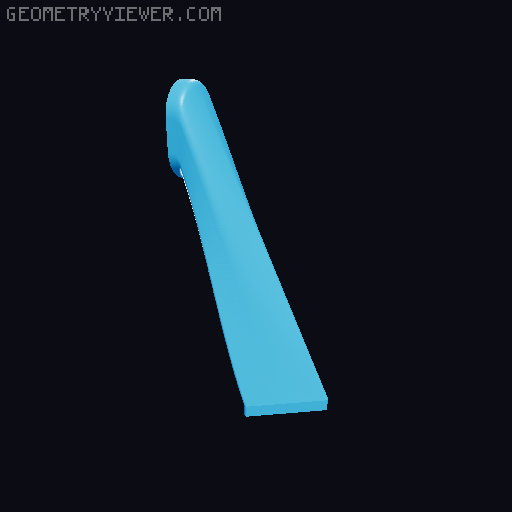
Park Blob Poop SV08 (PBP-SV08)
by GcodeGearHead · via Printables
| Format | STL |
| Category | Art |
| License | CC BY-NC-SA |
| Triangles | 47.8k |
| Uploaded | Oct 24, 2025 |
⬇ 75 downloads
❤ 45 likes
👁 2.3k views
Description
Presenting the Park-Blob-Poop-SV08 [PBP-SV08] ###### Please post your Makes ###### Please like this, download and post the make if you built it It helps us makers with feedback and gets us some Prusa meters as most people don't pay it forward Feel free to help my projects continue https://ko-fi.com/gcodegearhead ########################################################################### # Intro ########################################################################### I found there is not much space to work with outside the bed of the SV08 especially if you have a cable chain. So I have been designing this to be able to use a modified Blobifier design (remixed from Jager_F who remixed Dendrowen) and combined it with a remixed ooze pad and brush setup (remixed from Valerie Moore and Ioannis Giannakas) and then make a poop shoot that fits snugly into the base. You poop onto the blobifier and then it drops into the chute and disappears. This is not a beginner mod, you need to add a Rpi Pico, and modify the base of the printer for the chute. (And massage the poop chute into position) No buckets though and you can add a tray or funnel straight into the bin if you like. Pair this with my MMU https://www.printables.com/model/1314513-low-rider-mmu-for-any-klipper-printer You can pair this with my spool holder https://www.printables.com/model/1193075-4-5-spool-filament-dispenser-sv08-coprint-config-t Here is a calibration test for tuning https://www.printables.com/model/1322272-mmu-orca-flush-volume-test This is a DIY project with multiple interfacing parts which move in close proximity to each other. The quality of this project is strongly dependent on the accuracy of your printer, quality of your prints, and how well you clean them up. ########################################################################### # Updates ########################################################################### 23-OCT-2025 Updated a new chute with steeper angle. Requires feet with minimum 35mm under printer clearance 📷 Image redacted — claim this model to add your own media ########################################################################### # BOM ########################################################################### Parts Qty Info Rpi Pico1You will need to flash this with klipperM2x6mm SHCS2For Pico mountM2x8mm SHCS1SG90 CAM to Purge ArmM3x10mm SHCS2Ooze Arm to bracketM3x20mm2Bracket to 2020 mountM3 Nuts2Bracket to 2020 mountM5 x 8mm SHCS1For the Rev2 Chute Servo SG90 or MG901 Heat set inserts (M3)3use the STD M3 OD5 L5Aluminium or some heat sink12mm thick cut to fit armHigh temp Silicone A/RUsed to fill ooze arm, use as requiredBambu Silicone pad 1Can use any silicone wiper that fitsM4x20mm1Mount to 2020 ProfileM4 t nut1Mount to 2020 ProfileHVAC Aluminium self adhesive tape A/RPut wherever hot stuff touches printed parts2mm Drill Bit1Drilling out oval chute holeDremel , Files, BladesA/RWill make modifying printer base easier ########################################################################### # Print Settings ########################################################################### PETG Chute , print on triangle face use supports. Blobifier main Body Cover Blobifier Main Body, use supports Blobifier Mount, use supports Ooze Brush Arm Ooze Brush 2020 Mount Drill Guide ASA Ooze Brush base Purge Blob Arm CAM ########################################################################### # Assembly ########################################################################### Ooze Park Arm Print the files in the Ooze Brush Folder 2x M3 Heat Inserts 2x M3x10mm SHCS 2x M3x20mm SHCS 2x M3 Nuts High temp RTV Silicone Silicone Scrubber Brush Pipe the RTV silicone into the hole in the brush base 24hours before. Use a knife to cut off excess 📷 Image redacted — claim this model to add your own media Assemble the heat inserts into the arm with the 10mm screws and the 20mm screws go into the 2020 mount with nuts. Mount the arm and adjust the pad height so that the nozzle sits on the pad. 📷 Image redacted — claim this model to add your own media 📷 Image redacted — claim this model to add your own media Blobifier Print the files in the Blobifier Folder SG90 Servo and associated screws Rpi Pico M2x8mm SHCS Aluminium Pad Assemble the SG90 into the Main Body with the two mounting screws that come with it. 📷 Image redacted — claim this model to add your own media Install the CAM with the servo at 180 deg. Use the screw provided with the servo. 📷 Image redacted — claim this model to add your own media You will need to flex the Purge blob arm whilst inserting it 📷 Image redacted — claim this model to add your own media Slide the Bed mount in place and check everything moves freely. Candle wax is your friend. Secure the cam to the Purge blob arm but do not tighten down, it needs to slide. 📷 Image redacted — claim this model to add your own media Press fit mount it on the bed as follows, its a tight fit. (Note cover is not shown and new model has screw mounts) 📷 Image redacted — claim this model to add your own media Poop Chute Print the files in the Chute Folder 2mm Drill bit Dremel, files, blades, cutters etc…..This is where you will need to be patient and precise. Remove a little and test. Do not remove chunks at a time. There is a steeper chute which I recommend, it means you don't have to cut the triangle out the side of the printer. It uses 1xM5 by 8mm bolt and a t-slot nut. The install isn't the easiest but very doable. 📷 Image redacted — claim this model to add your own media 📷 Image redacted — claim this model to add your own media Remove the plastic in the side of the printer as per below. You will want this to be a clean cut, ensure the walls are parallel to the triangle pattern. This is the main fixation of the chute so you want it to be tight. 📷 Image redacted — claim this model to add your own media Place the drill guide on the corner of the printer. This is a tight fit and you need to push it on and hold it on the side of the printer bed tightly while drilling. Use the 2mm drill bit to drill through the guide and through the printer base. Yes the holes are smaller so you drill both and keep the tolerances tight. 📷 Image redacted — claim this model to add your own media 📷 Image redacted — claim this model to add your own media Use the cutters / larger drill bit and the files to remove the inner piece. 📷 Image redacted — claim this model to add your own media There are two internal ribs you also need to cut back. 📷 Image redacted — claim this model to add your own media No feed the chute in under neath the printer and massage it into place. It sits approx. 5mm into the printer side as just below the top oval hole you made. This will take some effort as it is a tight fit so that it stays in place. It is also why you should have printed it in PETG so it can flex. Insert the top cap into the hole and into the chute 📷 Image redacted — claim this model to add your own media ########################################################################### # Programming & Final Notes ########################################################################### You will need to flash the pico with klipper. (one of the many guides https://modkam.ru/2024/11/10/sovol-sv08-dopolnitelnyj-kontroller/ ) I named it mmu pico This is how to call the pin for the servo on GPIO 1 pin: pico:gpio1 . Wire the servo power to the main power supply and then the signal to GPIO pin1. Make sure to ground both the servo and the pico to the power supply ground. In order to get your coordinates, home your printer and then QGL. Manually move the print head with the controls in Mainsail and note down the positions. I am using Blobifier with Happy Hare. https://github.com/moggieuk/Happy-Hare/wiki/Addon-Feature-Setup#---blobifier https://github.com/moggieuk/Happy-Hare/wiki/Toolchange-Movement Here are my coordinates to get you started, make sure you check yours! Ooze pad =====> X20 Y361 Blob Pad =====> X51 Y361 If you not using Happy Hare here are stand alone macros in the linked remixes, and I urge you to go and read and see what's applicable to you. Feel free to help my projects continue https://ko-fi.com/gcodegearhead Enjoy, and as always post anything I have missed in comments or messages and I'll fix them.
Originally published on Printables





