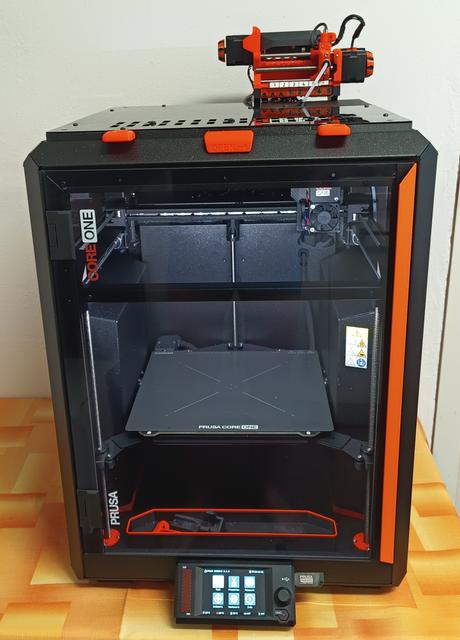
Prusa CORE One UltiMulti MMU3
by zdzd · via Printables
| Format | STL |
| Category | Art |
| License | CC BY-NC-SA |
| Uploaded | Jun 9, 2025 |
⬇ 100 downloads
❤ 62 likes
👁 3.0k views
Description
Mým záměrem bylo nainstalovat Ulti Multi MMU3 na CORE One bez toho aby se zásadněji měnily rozměry a nebyla potřeba baterie externích bufferů. Hlavní cíle: Významně nezvětšit rozměr CORE One. Udržet uzavřenost CORE One. Vytvořit možnost horního přístupu do CORE One. Umožnit jednoduché sundání a nasazení Ulti Multi MMU3 na CORE. Docílit co nejmenší délky PTFE trubičky k extruderu. Omezit potřebu externích bufferů. Nikde jsem nenašel řešení, které by to splňovalo. Použil jsem tedy myšlenky z několika zdrojů a provedl úpravy k docílení celkového výsledku. Základní myšlenkou byla odnímatelná instalace Ulti Multi MMU3 na horní okraj tiskárny, odnímatelné víko tiskárny s průchodem pro PTFE trubičku. A hlavně zabudování dvou dlouhodobě osvědčených Integrated Auto-Rewind Spool Holders do bočních prostorů CORE One. Takto se zachová kompaktnost a uzavření pro dvě barvy nebo rozpustné podpěry na pozici 1 a 5. V případě potřeby více barev ovšem nezbývá než dočasně připojit další externí Auto-Rewind Spool Holders. Potřebné úpravy: V obou bočních krytech doplnit otvory pro instalaci Auto-Rewind Spool Holders a průchod PTFE trubičky. Rewindery jsou nasunuty a upevněny na šroubech M6. Do zadních sloupků doplnit otvory a FESTO pro průchod PTFE trubičky. Do horního zadního pravého rohu doplnit otvor pro šroubek držáku Ulti Multi MMU3. Víko předělat na odnímatelné a vyříznout v něm prostor vodítko PTFE trubičky. Vytisknout a instalovat vodítko PTFE trubičky. Pracovní postup: Kompletní návod není zapotřebí, vše je zřejmé z přiložených fotografií. Tištěné díly: Všechny použité díly jsou přiloženy. Toto řešení mi vyhovuje mnohem více než odkrytovaná tiskárna a spousta doplňků okolo, či bedna nad tiskárnou. Málokdy tisknu něco, co potřebuje více než dvě barvy. Dočasné přistavení rewinderu v takovém případě nějak překousnu. Flexibilní instalace Filamentalist_Rewinder o šířce vhodné na CORE One je popsána v mém Adaptable rewinder installation on Prusa CORE One UltiMulti MMU3 modelu. Věřím, že toto řešení se hodí více lidem, minimálně jako inspirace. ====================================================== My intention was to install the Ulti Multi MMU3 on the CORE One without significantly changing the dimensions and without the need for a set of external buffers. Main goals: Not to significantly increase the size of the CORE One. To keep the closed design of the CORE One. To create the possibility of top access to the CORE One. To enable easy removal and installation of the Ulti Multi MMU3 on the CORE. To achieve the shortest possible length of the PTFE tube to the extruder. To reduce the need for external buffers. I could not find a solution anywhere that would meet this. So I used ideas from several sources and made changes to achieve the result needed. The basic idea was a removable installation of the Ulti Multi MMU3 on the upper edge of the printer, a removable printer lid with a passage for the PTFE tube. And most importantly, the installation of two long-proven Integrated Auto-Rewind Spool Holders in the side spaces of the CORE One. This will maintain compactness and closure of the printer even in case for two colors or soluble supports at positions 1 and 5. However, if more colors are needed, there is no choice but to temporarily connect additional external Auto-Rewind Spool Holders. Necessary modifications: Add holes in both side covers for installing Auto-Rewind Spool Holders and passing PTFE tubes. Rewinders are inserted and fixed on M6 screws. Add holes and FESTO to the rear posts for passing PTFE tubes. Drill hole for the Ulti Multi MMU3 holder screw to the upper rear right corner. Make the lid removable and cut out a space for the PTFE tube guide in it. Print and install the PTFE tube guide. Workflow: Complete instructions are not needed, everything is clear from the attached photos. Printed parts: All parts used are included. This solution suits me much better than an uncovered printer and lots of accessories around it, or a big box above the printer. I rarely print something that needs more than two colors. In that case, I have to temporarily add a a rewinder. A flexible installation of the Filamentalist_Rewinder with a width suitable for the CORE One is described in my Adaptable rewinder installation on Prusa CORE One UltiMulti MMU3 model. I believe that this solution suits more people, at least as an inspiration.
Originally published on Printables





