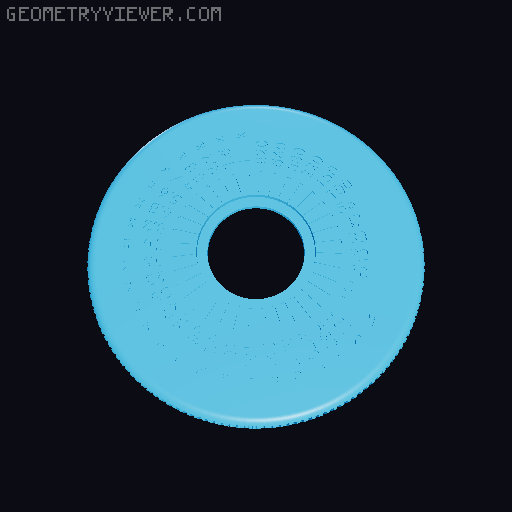
Resistance substitution wheel (customizable)
by wanderlustig · via Thingiverse
| Format | STL |
| Category | Electronics |
| License | CC BY-NC-SA |
| Triangles | 191.0k |
| Uploaded | Mar 19, 2026 |
⬇ 250 downloads
❤ 32 likes
👁 1.2k views
Description
This is a clone of the Tandy/Radio Shack resistance substitution wheel that they sold back in the '80s. The device that inspired this design can be seen in Big Clive's recent YouTube video . This is a pre-release version. The code will see little change but instructions, etc. will be added. Watch this page to be notified when they are released. The device as modeled is 4" ∅ × 1" thick (101.6 mm ∅ × 25.4 mm thick). Per Clive the original device is 66 mm ∅ × 17.5 mm thick. In the final version of the code one will be able to generate a smaller (or larger) device but for now bugs prevent changing the size (in specific the thickness). Materials needed: A resistor for each value (either through-hole or SMD can be used; 1% 250 mW or higher recommended) 20 mm or ¾" nut & bolt (metric or SAE) – I used a #8 × ¾" SAE pan-head bolt as I had one on hand. Self-adhesive copper tape (50 mm or wider recommended) Wire leads with alligator clips Solder and soldering iron For the body I used PLA while the inner parts (circuit board and springs) were printed with PETG (which is more heat-resistant and should retain it's springiness better over time). The text was filled in with a white china marker; in retrospect using acrylic paint would have been better (black first to fill any gaps followed by white to fill in the text). Files For OpenSCAD the following files are needed: Resistance_substitution_wheel.scad M3x0.5x20mm.stl (for visualization only, not for printing) M3x0.5_nut.stl (for visualization only, not for printing) For the pre-rendered STL files: Match to the nut/bolt size you're using. Choose one of: bottom_5.stl bottom_6.stl bottom_8.stl bottom_10.stl bottom_M2.5.stl bottom_M3.stl bottom_M4.stl bottom_M5.stl circuit_board.stl Match to the nut/bolt size you're using. Choose one of: top_center_5.stl top_center_6.stl top_center_8.stl top_center_10.stl top_center_M2.5.stl top_center_M3.stl top_center_M4.stl top_center_M5.stl top_ring.stl top.stl wipers.stl Notes To change the printed resistor values edit the value_labels parameter. The nut and bolt STL files that are included are only for illustration purposes within OpenSCAD. You should use a steel nut and bolt for the actual device. The circuit board is 3D-printed. This was done as an experiment and worked out pretty well. I did find that the marking of the bottom of the board and the lead holes didn't survive in the final print; this isn't an issue if using SMD resistors (which is what I used) but may be an issue if using through-hole components. After printing the wipers component the supports on the detent springs need to be cut away and the slots above them cleaned up. The copper tape should be applied to the circuit_board and wipers components and the wire leads soldered to the wipers . For the circuit board the copper tape should be firmly applied and then gaps between and under the resistors should be cut away. The copper on the outer edge should be kept narrow so that the wiper can only contact one resistor's copper at a time; this ensures break-before-make behavior and prevents unexpected transient low resistances from two resistors being connected in parallel. When soldering in the resistors make sure their values are in the correct order, i.e. matching what's printed on the top! When soldering take care to only apply heat briefly lest the circuit_board or wipers components get melted. If using 50 mm copper tape then the two halves will need to be soldered together on the inner ring (relying on the adhesive's conductivity is insufficient). Bridging over the gap where the two pieces of tape abut will do the trick but take care not to apply solder where the wiper makes contact (likewise take care not to get solder in the area where the outer wiper travels). I used resistors that I had on hand. For that reason multiple resistors are used in series or parallel to get resistances that I don't have. I added a 2-pin header and socket inline on the wires inside the case. This could be omitted. The internal components are keyed to ensure proper alignment. The dot on the top center component aligns with the outer wiper on the wipers component. Likewise the top , top_ring , and circuit_board components are keyed with the key position corresponding to the lowest value. There is a known issue with the width of the nut slot being too wide. For the device that I printed I screwed the bolt into the nut and then used hot glue to hold the nut it place; this was done prior to assembling the device. Changing the overall height does not currently work correctly. This will be fixed in the final release. Likewise the heights of the top and bottom halves cannot currently be independently specified. The wire holes are probably a bit on the narrow side. I recommend printing it as-is and then fine-tuning the wire hole size with a file. Most of the dimensions are specified in imperial units. This was done as an experiment (I reckoned that the original was designed using imperial units). In retrospect I should have used metric for all dimensions. Printing notes A layer thickness of 0.2 mm and 15% infill (3D honeycomb) was used for all components except circuit_board for which I used 100% infill. bottom Print outer surface down, supports around bolt hole circuit_board Supports only needed for a 2-side board (i.e. for through-hole resistors) top_center Print text side down, no supports top_ring Print detents down, no supports top Print text side down, supports along inner rim wipers Print flat side down, no supports The bottom and top_center parts should be matched to the nut and bolt size that you're using. e.g. if using a #8 SAE nut and bolt use bottom_8.stl and top center_8.stl ; if using an M4 nut and bolt use bottom_M4.stl and top_center_M4.stl Version history 0.9 — 2026-03-19 Initial public pre-release 0.9.1 — 2026-03-20 Set spring_compress to its as-printed value ( 1.0 )
Originally published on Thingiverse





