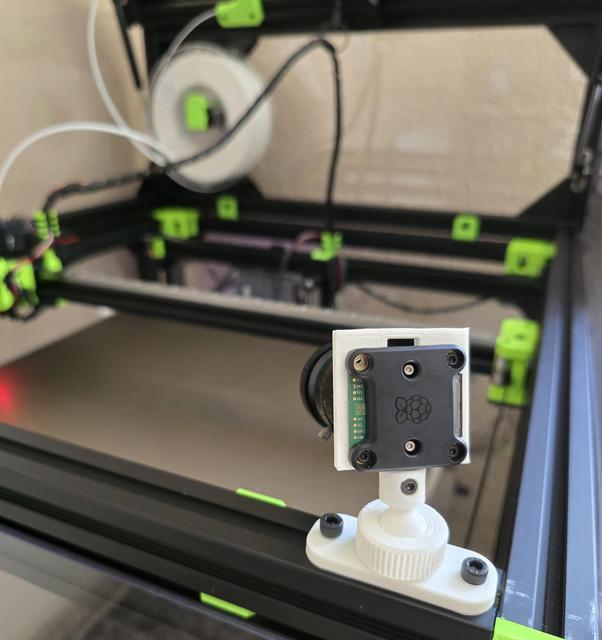
RPI GS&HQ Camera mount on 3030 extrusion
by EEngin33r · via Printables
| Format | STL |
| Category | Art |
| License | CC BY-SA |
| Triangles | 53.8k |
| Uploaded | Sep 2, 2024 |
⬇ 29 downloads
❤ 2 likes
👁 167 views
Description
Raspberry PI GS & HQ camera mount: I made this RPI GS&HQ camera holder for my upcoming project. It can be mounted on 3030 extrusion. Maybe 2020 as well if you do not mind that it is extending beyond the profile. What you will need: Ball.stl Base.stl CameraMount.stl Screw.stl Hardware: 2 x M5x12 CH screw & 2 x M5 3030 T-Nut 1 x M3x12 CH screw & 1 x M3 hex locking nut 4 x M2.5x8 CH screw & 4 x M2.5 hex locking nut First you have to screw off the stock tripod mount that came with the camera: 📷 Image redacted — claim this model to add your own media Every part is quite tight, so be careful. After that you are able to mount the CameraMount.stl onto the PCB with the M2.5 screws. Feel free to rotate it when it is on. Put on the screw and push the whole into the Ball.stl. Lock it with the M3 screw, after that you can mount it with the Screw.stl onto the Base.stl. Mount it wherever you would like to on an extrusion! NOTE: First I made a version where the ball was directly mounted to the original RPI GS camera tripod mount with ¼"-20 printed screw. I have uploaded it, but use it only if you like to live dangerously. The camera is quite heavy so I have decided not to go that way.
Originally published on Printables





