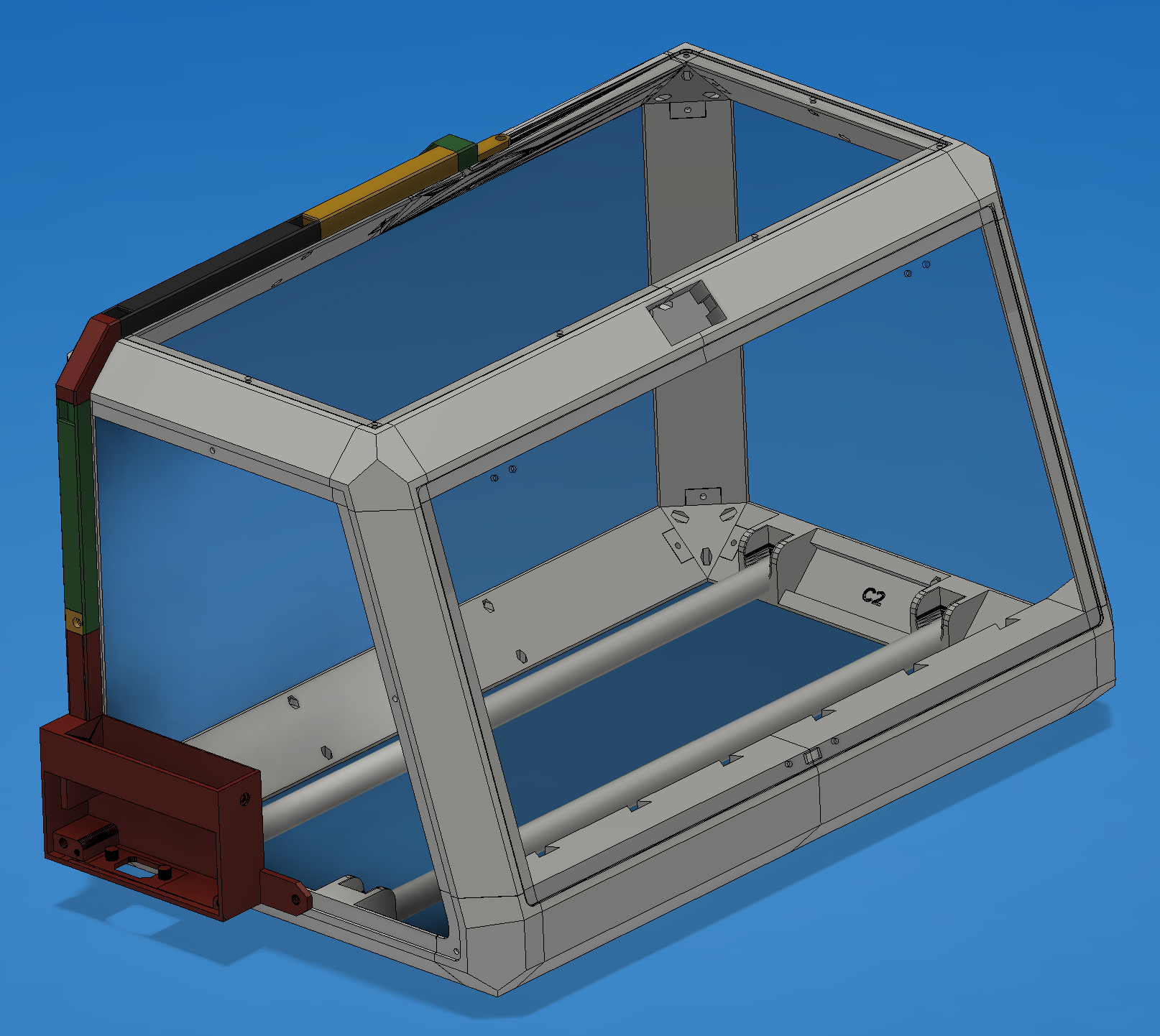
Sidemount PSU and Wire Channels for (Un)Original Prusa Drybox
by wbsp · via Printables
| Format | STL |
| Category | Mechanical |
| License | CC BY-NC-SA |
| Triangles | 20.4k |
| Uploaded | Sep 3, 2024 |
⬇ 56 downloads
❤ 15 likes
👁 507 views
Description
The stls are organized below in what you will need for a left vs right mounting. You will need to drill a small hole in the plexiglass sidewall where you choose to mount the PSU. The updated screw lengths going through the wire channels and C1/C2 mount (side of PSU) need to be M3-16mm. The wire channels are fully covered and printed in segments. The wire channels are screwed down at the points where the outer plexiglass windows are screwed down in the drybox. The pictures will guide your assembly. Let me know if more detail is needed. Pretty much, the wire channels are named in a way that makes sense. As you move out from the PSU (regardless of right/left mount orientation), they are: vertical-channel.stl, diagonal-channel.stl, horizontal-channel.stl, {left,right}-passthrough-channel.stl (this is the wire channel that will interface with the beam underneath it), and the {left,right}-beam-interface. The beam interface just snaps into place with the passthrough channel. There are “joint covers” for the screw down points, where the wire channel segments intersect. There are two variants: the joint-cover-easy, and joint-cover STLs. The "not easy ones" have an extrusion downwards that puts direct pressure on the intersection of the two wire channels. When using this, you need to reach into the wire channel and brush the wires out of the way long enough to put this extrusion down. It is not too bad. the joint-cover-easy STL has no such extrusion down into the wire channel and is a lot easier as a result. The joint-covers are the only part you will need to print more than one of. You will need 4 of the one you select. I printed this in PETG, .2mm layer line, .4mm nozzle, MKIS .2mm Structural profile. The wire channels mostly don't need support. The PSU mount itself will require some supports. I used the automatic support painting in the slicer and it did something very minimal and fine. The {left,right}-beam-interface needs to be printed with the top on the build plate and supports set to “everywhere”, more than likely.
AI Analysis: This is a model of a side-mounted power supply unit and wire channels for an unoriginal drybox. The structure features a rectangular frame with transparent panels and internal channels designed to hold electrical components and wiring. The model includes a mounting bracket and a side-mounted component with colored sections, likely for identification or labeling. The design is intended for use in a drybox environment to safely store and organize electrical equipment.
Originally published on Printables



