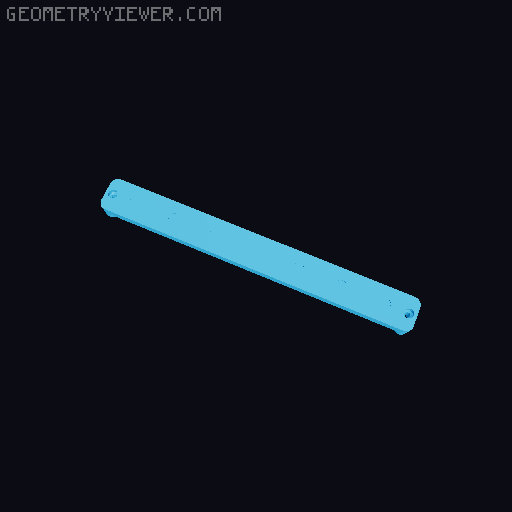
SKADIS Magnetic Tool Holder
by orax · via Printables
| Format | STL |
| Category | Tools |
| License | CC BY-SA |
| Triangles | 6.9k |
| Uploaded | Apr 16, 2023 |
⬇ 643 downloads
❤ 332 likes
👁 9.9k views
Description
A parametric magnetic tool holder for the IKEA SKADIS pegboard system allowing you to attach screwdrivers and other tools magnetically to your pegboard. The included Fusion 360 parametric source file allows you to create an infinite set of the tool holder using any size of cylindrical magnet and will calculate the proper size for the module by itself (to ensure it is always aligned with the SKADIS hole spacing). See the Create your own section for more information about building a custom model. This project uses the the T-Nut mounting system created by @6d6178 to attach to the pegboard itself and uses BV3D's method to print indicators on the first layer in a different color without requiring the use of a multi material system. I have included a set of already exported models if you just want to print this project without customizing it, see the Available models section down below for a description of each available models (as which parameters were used to create them). Printing & Assembly In order to build a complete module you will need the following things: 1× Magnetic tool holder body (any variant from this project) 2× Printed M2.5 T-Nuts ( found here ) 2× M2.5 DIN934 Hex nuts 2× M2.5 × 16mm or M2.5 × 18mm screws The size and amount of magnets needed for the body style selected 📷 Image redacted — claim this model to add your own media Once you have selected which module you want to print (see the Available models section for a preview of all available size & variant), you will need to print the model front-face down with the locating prong upward (opposite to how the STL are exported) using the following recommended print settings: Layer Height : 0.2mm Infill : 20 to 40% Raft / Supports / Brim : no Seam position : Aligned (recommended) If you decide to print the With indicators variant of a model, you will need to follow BV3D's method to print the *-insert.stl file first on your build plate (make sure to set you Elephant foot compensation to zero for this step), then remove any purge line / skirt before printing the body model. To assemble your model, you will just need to press-fit your magnets into the back-side of the module then insert your M2.5 screws from the front and attach your T-Nuts from the back. You should then be able to just slot the module in your SKADIS board and tighten the screws from the front to attach them permanently. Available models Exported models are available for two different types of configuration: Screwdriver holders : uses 2 rows of 5 mm × 5 mm magnets (using 2 rows allows screwdriver to stay aligned) Tool holders : uses a single row of 10 mm x 5 mm magnets (using a bigger magnet allows the use of stronger magnet to attach heavier tools) 📷 Image redacted — claim this model to add your own media Each model are also available in two variants: With indicators : that should be printed in another color to show where the magnet are from the front of the module Blank : a version with no indicator (easier to print as you do not need to print “two first layers” on top of each other Screwdrivers holders skadis-screwdriver-2x2 📷 Image redacted — claim this model to add your own media Number of slots: 2 Required magnets: 4 Size : 48 × 18 mm (1 space) Files (with indicators): - skadis-screwdriver-2x2.stl - skadis-screwdriver-2x2-insert.stl Files (blank variant): - skadis-screwdriver-2x2-blank.stl skadis-screwdriver-4x2 📷 Image redacted — claim this model to add your own media Number of slots: 4 Required magnets: 8 Size : 88 × 18 mm (2 spaces) Files (with indicators): - skadis-screwdriver-4x2.stl - skadis-screwdriver-4x2-insert.stl Files (blank variant): - skadis-screwdriver-4x2-blank.stl skadis-screwdriver-6x2 📷 Image redacted — claim this model to add your own media Number of slots: 6 Required magnets: 12 Size : 128 × 18 mm (3 spaces) Files (with indicators): - skadis-screwdriver-6x2.stl - skadis-screwdriver-6x2-insert.stl Files (blank variant): - skadis-screwdriver-6x2-blank.stl skadis-screwdriver-8x2 📷 Image redacted — claim this model to add your own media Number of slots: 8 Required magnets: 16 Size : 168 × 18 mm (4 spaces) Files (with indicators): - skadis-screwdriver-8x2.stl - skadis-screwdriver-8x2-insert.stl Files (blank variant): - skadis-screwdriver-8x2-blank.stl With the exception of MagnetColCount (set to the number of slots) all parameters are set to the following values for all previous models: ParameterValueParameterValueModuleHeight 18 mm MagnetColSpacing 20 mm ModuleThickness 10 mm MagnetRowCount 2 MagnetDiamaeter 5 mm MagnetRowSpacing 8 mm MagnetThickness 5 mm SlotWidth 4 mm MagnetTolerance 0.2 mm SlotHeight 10 mm Tool holders skadis-tool-1x1 📷 Image redacted — claim this model to add your own media Number of slots: 1 Required magnets: 1 Size : 48 × 18 mm (1 space) Files (with indicators): - skadis-tool-1x1.stl - skadis-tool-1x1-insert.stl Files (blank variant): - skadis-tool-1x1-blank.stl skadis-tool-3x1 📷 Image redacted — claim this model to add your own media Number of slots: 3 Required magnets: 3 Size : 88 × 18 mm (2 spaces) Files (with indicators): - skadis-tool-3x1.stl - skadis-tool-3x1-insert.stl Files (blank variant): - skadis-tool-3x1-blank.stl skadis-tool-5x1 📷 Image redacted — claim this model to add your own media Number of slots: 5 Required magnets: 5 Size : 128 × 18 mm (3 spaces) Files (with indicators): - skadis-tool-5x1.stl - skadis-tool-5x1-insert.stl Files (blank variant): - skadis-tool-5x1-blank.stl skadis-tool-7x1 📷 Image redacted — claim this model to add your own media Number of slots: 7 Required magnets: 7 Size : 168 × 18 mm (4 spaces) Files (with indicators): - skadis-tool-7x1.stl - skadis-tool-7x1-insert.stl Files (blank variant): - skadis-tool-7x1-blank.stl With the exception of MagnetColCount (set to the number of slots) all parameters are set to the following values for all previous models: ParameterValueParameterValueModuleHeight 18 mm MagnetColSpacing 22.5 mm ModuleThickness 10 mm MagnetRowCount 1 MagnetDiamaeter 10 mm MagnetRowSpacing 0 mm MagnetThickness 5 mm SlotWidth 6 mm MagnetTolerance 0.2 mm SlotHeight 6 mm Create your own If you wish to create your own module for other sizes of magnet or with a different spacing, the included Autodesk Fusion 360 source file ( skadis-magnetic-toolholder.f3d ) comes with a set of parameters allowing you to configure it to your need. Here is the full list of available parameters with their descriptions: 📷 Image redacted — claim this model to add your own media The model should adapt itself in length and height based on the parameter given to make sure it will always fit in the standard SKADIS spacing. If you need some inspiration, checkout the Available models section to see which parameters have been used to generate them. Changelog V1.0 (2022-09-25): Initial release V1.0 (2022-09-28): Updated description
Originally published on Printables