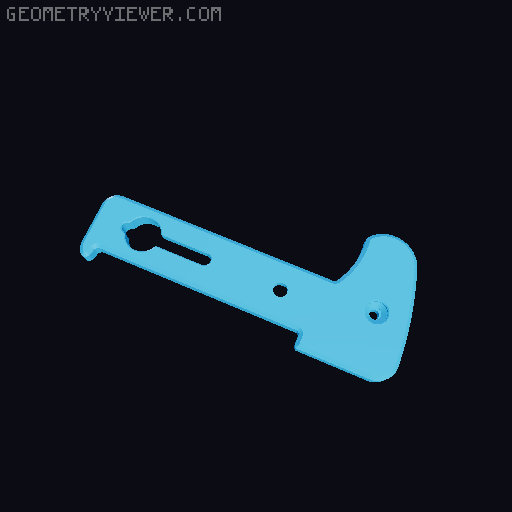
Small Camera Clutch Straps (EM5, GM1, Z30)
by RagingRoosevelt · via Printables
| Format | STL |
| Category | Gadgets |
| License | CC BY-NC-SA |
| Triangles | 10.5k |
| Uploaded | Feb 26, 2026 |
⬇ 2 downloads
❤ 6 likes
👁 109 views
Description
I designed this clutch strap for a couple of my cameras. It's loosely inspired by the Peak Design clutch. I wanted to be able to leave the clutch on while still being able to tripod mount my camera, so I incorporated a 1/4"-20 hole pretty close to where the stock one is on the camera. BOM Item # Photo M4x8mm FHCS src1 src2 1 📷 Image redacted — claim this model to add your own media M3x5mm BHCS (±1mm likely ok) src1 src2 1 📷 Image redacted — claim this model to add your own media M3 lock nut src1 src2 1 📷 Image redacted — claim this model to add your own media 1/4"-20 D-ring screw for tripod src1 src2 1 📷 Image redacted — claim this model to add your own media 1/4"-20 heat set src 1, optional 📷 Image redacted — claim this model to add your own media 📷 Image redacted — claim this model to add your own media Rubber Grip Tape (1" or wider) src1 src2 📷 Image redacted — claim this model to add your own media Clutch Mount (3d printed) 1 There's a version with and a version without a 1/4"-20 hole for the heatset. Go without if you don't need to be able to mount to a tripod. 📷 Image redacted — claim this model to add your own media Clutch Strap (3d printed) 1 There are various length options. I indicated the ones that I thought fit well, but you can size up or down as needed. The EM5 mk.I, EM5 mk.2, and Z30 all use the same strap dimensions so you can grab extended sizes from the folder of extra long and extra short straps. 📷 Image redacted — claim this model to add your own media Strap comfort piece (3d printed) 1, optional 📷 Image redacted — claim this model to add your own media The bolts can probably be found in assorted kits, too. Printing Clutch mount Ideally this should be printed in PETG or ASA, but PLA is fine too if it isn't going to sit in the heat of your car. Orient with the larger part of the M4 screw hole facing the bed. Print with 4 walls. ~15% infill is fine. You'll need to enable supports inside the slot. Strap and Strap Comfort Piece Print in TPU. Orient flat side down. Print with 4 walls. I like setting the top and bottom surface pattern to concentric but it shouldn't really matter. It's only 6 layers thick so all layers should be top or bottom layers (and shouldn't have any infill). Assembly Step Photo Use a small pry tool or small flat head screw driver to carefully remove the support from the clutch mount. 📷 Image redacted — claim this model to add your own media Slide the Clutch Strap into the slot you cleared. 📷 Image redacted — claim this model to add your own media Screw your M4 flat head bolt through the mount, through the strap, and into the other side of the mount's slot. The bolt head should be below the surface of the mount when it's properly in place. 📷 Image redacted — claim this model to add your own media If using the 1/4"-20 heat-set, install it now (through the larger opening of the heat-set hole. 📷 Image redacted — claim this model to add your own media Apply the grip tape to the side of the clutch mount that has the M4 bolt head. You may need to apply the tape in two strips to cover the full width of the mount. 📷 Image redacted — claim this model to add your own media Trim the grip tape to the outside border of the mount. Trim the grip tape to re-open the keyhole for the 1/4"-20 bolt but don't trim the hole for the 1/4"-20 heatset. 📷 Image redacted — claim this model to add your own media If using the comfort piece, thread the narrow end of the strap through one slot in the comfort piece and out the other slot. 📷 Image redacted — claim this model to add your own media Run the narrow end of the strap through the strap attachment point on your camera. 📷 Image redacted — claim this model to add your own media With the narrow end of the strap looped around the attachment point, line up the screw holes on the end of the strap and stick the M3 bolt through the hole. Tighten the M3 lock nut on. Thread the 1/4"-20 bolt into your camera's tripod mount but don't tighten it very much. 📷 Image redacted — claim this model to add your own media Slide the mount keyhole over the 1/4"-20 bolt and into position. 📷 Image redacted — claim this model to add your own media Tighten the 1/4"-20 bolt until the mount doesn't move any more. It may need to be pretty tight. 📷 Image redacted — claim this model to add your own media
Originally published on Printables





