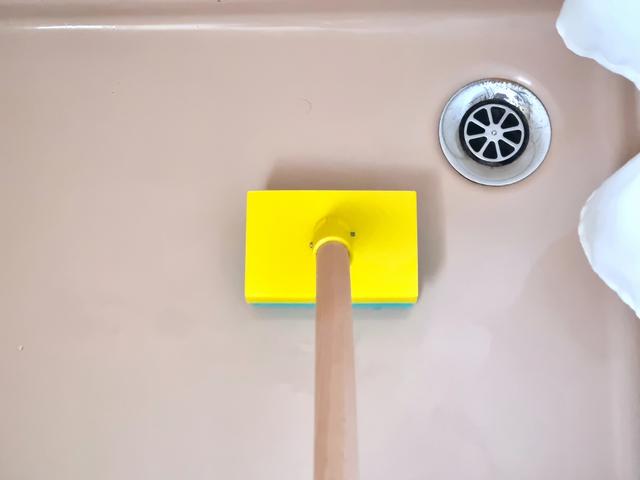
Sponge Extender (Customizable)
by Thinger13 · via Thingiverse
| Format | STL |
| Category | Other |
| License | CC BY-NC |
| Uploaded | Mar 30, 2026 |
⬇ 2 downloads
👁 15 views
Description
Clean floor and walls of your shower stall without bending over or stretching. How to assemble: Add a broomstick of suitable diameter and length (e.g. 100 cm) and clamp your sponge into the holder. A sponge with a rough scrubbing back (see picture) seems best suited. The supplied .stl files assume a sponge footprint of 70 x 110 mm, a sponge clamping height of 12 mm and a broomstick diameter of 20 mm (plus 0.6 mm over-extrusion into the flange's bore for the broomstick). If this does not fit your sponge or broomstick dimensions, then you may create custom .stl files either in OpenSCAD or via the online Customizer: Download the enclosed OpenSCAD source file, open it in OpenSCAD and adapt the x_sponge, y_sponge, z_clamp and d_broomstick parameters at the top and create a customized .stl file. You must have OpenSCAD already installed on your computer or install it now according to the instructions below. Installing OpenSCAD and editing the parameters is not difficult or time-consuming. Or use the Thingiverse online Customizer (see the link below the main picture's lower left) to adapt the dimensions to your specific needs. Using the Customizer requires a Thingiverse account, but downloading the OpenSCAD source file and installing OpenSCAD is not necessary in this case. The Customizer will access my uploaded OpenSCAD source file directly, create a new thing according to your parameter inputs and put it into your personal Thingiverse profile (it may take a while), from where you can download the customized .stl file and print it. To remove the Customizer-created thing from your profile: Select your thing in your profile and click the "Edit Thing" button, scroll down to the end, acknowledge the "Delete Thing" tickbox and click the "Delete Thing* button. For the holder part supports are required (see picture). The flange does not need supports inside the bore for the broomstick due to a CAD trick. Apart from the printed parts you will need: One screw M3 x 6 mm plus nut to fix the hinge to the holder. As an alternative you may glue the hinge to the holder. One screw M3 plus nut to connect hinge and flange. The screw's minimum length will depend on the broomstick diameter (screw length >= broomstick diameter + 2 mm). I use a M3 x 25 mm screw for a 20 mm broomstick. One or two 2.9 x 6.5 mm sheet metal screws to secure the broomstick to the flange. As always I include the OpenSCAD source file for you to adapt and/or improve: Download and install OpenSCAD from https://www.openscad.org Launch OpenSCAD and open the enclosed OpenSCAD source file (/File/Open). Amend the parameters at the top of the file or even amend the code. Save your changes (/File/Save). Render the design (/Design/Render). Export the rendered design e.g. as a .stl file (/File/Export/Export as STL). Slice and print. See my other designs at https://www.thingiverse.com/thinger13/designs
Originally published on Thingiverse





