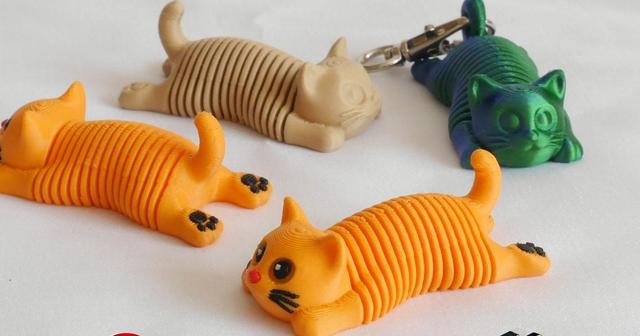
Springy Cat
by C47_3d · via Printables
| Format | STL |
| Category | Mechanical |
| License | CC BY-NC-ND |
| Uploaded | Apr 25, 2026 |
⬇ 9.5k downloads
❤ 1.0k likes
👁 24.6k views
Description
Small Cat with a springy body Additional keyring model Optional models for a multicolor print If you want to sell prints of this model you can buy a commercial license here: https://cults3d.com/en/3d-model/game/springy-cat-commercial-license Short Video: https://www.instagram.com/p/DWqpUJkjYqn/ Check my Flexi models: https://www.printables.com/@C47_3d/collections/1869277 Printing tips Printed with 0.16 and 0.2 layer height 2-3 walls No supports needed Arachne wall generator recommended (instead of a Classic) - print will be a little stronger May be harder to print than typical models You will need a good bed adhesion and a good cooling You may be needed to separate spring coils from each other after a print. Usually just with your finger nails, in some more rare cases with a thin knife (scalpel) It mostly depends on your seam settings and filament stringing If you will have problems with a nozzle knocking out spring coils you can use Spring-joiner (merged with model) wich will connect spring coils with lines of filament - you will need to cut it with a knife after print When it will help only for bottom parts you can also use Spring-jointer-top to add lines connecting coils on the top I printed mine without Spring-joiners but I used some glue on the bed plate MULTICOLOR Select SpringyCat (or -Keyring) and all of MULTI files, then drop them in slicer, merge together and select color for each part You don't need to use all the files if you don't want to. You can print for example without Sparkle or different color whiskers (would be a color of body) SpringyCat - Whatever color you like Eyes Inner - Black or dark colors Eyes outer - White or light colors Eyes sparkle - White or very light color Nose - Red, pink, brown Paddings - Black or dark brown Smile - Red Whiskers - Black Multicolor files are with a 'frame' that helps with models aligning DO NOT try to 'repair' the models - frame will not be printed and it's not causing any problems with slicing Tips if the model is breaking Filament should be dry and with good self adhesion Printing with wet filament will make the model more brittle (especially PLA) and Piggy may break when stretched Silk filaments (especially dual or tripple color) and the ones with particles (like 'marble') may not be a good option - but it all depends on the filament You can try printing it slower, bonds between layers should be stronger Update 25 IV 2026 Fixed a weak spots on the spring connecting to head and back Optimised a spring in the middle part (diagonal) Fixed Paddings aligment (multicolor file)
Originally published on Printables



