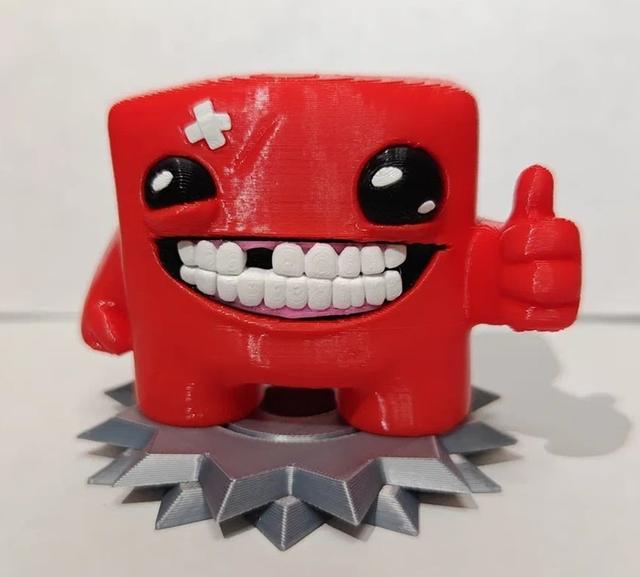
Super Meat Boy Figure (Multi-Color, NO AMS Required)
by Krashl · via Thingiverse
| Format | STL |
| Category | Art |
| License | CC BY-SA |
| Triangles | 61.1k |
| Uploaded | Apr 2, 2026 |
⬇ 61 downloads
❤ 2 likes
👁 76 views
Description
Meet Super Meat Boy! 🥩 You DO NOT need a multi-color printer (like AMS or MMU) to make it look this good! The model is cleverly split into separate parts by color. You just print the parts in their respective filament colors and follow the simple assembly steps below. It's a fun project with a fantastic, vibrant result. Printing & Assembly Guide (By Color): 🔴 Red: Body_Red.stl ⚪ White: Eye_Highlights_White.stl, Teeth_White.stl, Bandage_White.stl ⚫ Black: Eyes_Black.stl, Mouth_Background_Black.stl 🌸 Pink: Gums_Pink.stl ⚙️ Silver/Grey: Saw_Base_1_Silver.stl, Saw_Base_2_Silver.stl 💡 Important Printing Tip: For the best visual result, I highly recommend printing the main Red Body at a 45-degree angle. This will significantly reduce the visible layer lines (staircase effect) on the large flat top of his head! Step-by-Step Assembly Instructions (See attached image): The Mouth: Take the black mouth background, insert the pink gums, and then add the white teeth. Use super glue (CA glue) to secure them. The Eyes: Insert the white highlights into the black eyes. This is designed to be a very tight friction fit! You can gently tap them in. Glue is not strictly necessary here because of the tight fit. The Face: Insert the assembled mouth, eyes, and the white bandage into the main red body. Add a small drop of glue into the recesses before inserting the parts. The Base: Glue the top part of the saw base onto the bottom part. Final Assembly: Place Super Meat Boy onto the pegs of his saw base. Done! Your figure is ready for display.
Originally published on Thingiverse





