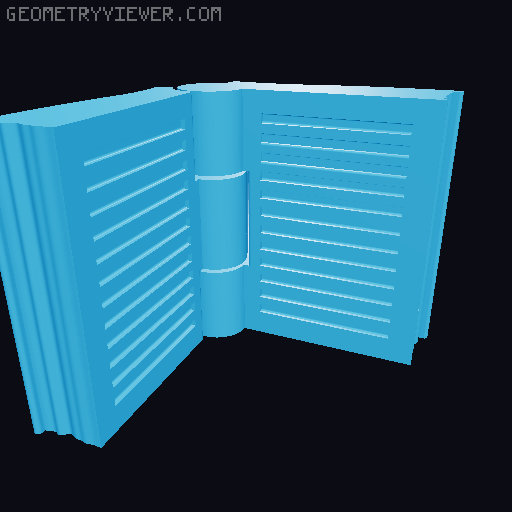
The Book - Combined bookmark and page holder
by Silfer · via Printables
| Format | STL |
| Category | Gadgets |
| License | CC BY-NC-ND |
| Triangles | 65.0k |
| Uploaded | Dec 23, 2022 |
⬇ 1.6k downloads
❤ 688 likes
👁 10.2k views
Description
2022-12-21: I've added a new single blade version which doesn’t require magnets or glue to assemble. 2022-12-21: I've added a new version which only has the page holder and no blades. 2022-12-20: Magnetic bookmark with two blades published. Also see the other “The Book” design I’ve made, a magnetic pencil holder bookmark: https://www.printables.com/model/347051-the-book-magnetic-pencil-holder Introduction The Book has print-in-place hinges and no supports are required. The blades are printed separately to improve the quality and strength. You don’t need any additional hardware or glue for the single bladed version , but the double bladed version requires two 6mm x 3mm magnets and the blades has to be glued into place. I’ve included .gcode files for all versions which you can use out of the box! If you are slicing the files yourself, I’d recommend to print them on 0.15mm layer height for best results. Please see the pictures for the differences between the versions! The available versions are; Single Bladed Double Bladed Page Holder only Note: There is a difference on the blade design between the single and double bladed versions. Make sure to print the correct one! Single Bladed version - Assembly Instructions 1. You need 1x “ TheBookSingleBlade - Body.stl” and 1x “TheBookSingleBlade - Blade.stl” . The files are already on the correct orientation for printing. No supports are required! Alternatively you can use the pre-sliced .gcode files I’ve provided. 2. After printing both of the parts, check that there are no obstructions in the hole on the book. You can use the sharp end of the blade for this! 3. The blade is meant to be friction fit. This means that it might be a bit tight to insert! To help with inserting it, you can moisten the blade on the end which is inserted into the book. Remember to check the correct orientation of the blade! 4. That’s it. Now go enjoy a nice book! Double Bladed version - Assembly Instructions 1. You need 1x “TheBookDoubleBlade - Body.stl” and 2x “TheBookDoubleBlade - Blade.stl” . The files are already on the correct orientation for printing. No supports are required! Note: If you are using the .gcode files I’ve provided, that already has two blades on it. 2. You need 2x 6mm x 3mm magnets . Push the magnets on their places. Add some superglue on the blade indentation. There is no need to add glue on the magnets as the blade will cover them. 3. Push both of the blades on their places. The pins on the blades will align on the holes on the book. 4. Enjoy a good book! Page Holder only version - Assembly Instructions 1. You need 1x “TheBook - Page Holder Only.stl”. The file is already on the correct orientation for printing. No supports are required! 2. That’s it, i.e. there is no assembly ;) Created for the Printables Bookmark contest.
Originally published on Printables





