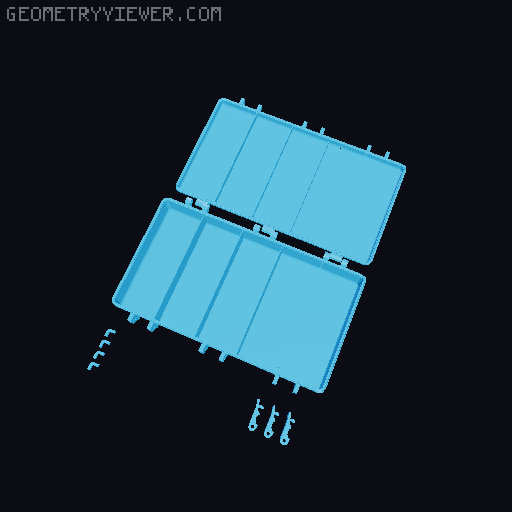
Ultra Thin Screw/Small Object Container/box
by Iceman · via Printables
| Format | STL |
| Category | Organisation |
| License | CC BY-NC-SA |
| Triangles | 15.4k |
| Uploaded | Dec 17, 2024 |
⬇ 455 downloads
❤ 88 likes
👁 2.2k views
Description
What/Why These boxes are based off my “ Super Customizable Rugged Box in OpenSCAD ” where you can create any size and style rugged box that you want. It has 60+ customizable parameters where you can create any size/shape rugged box that you want. Anyway, I needed a minimalistic, stackable standard size box for screws and other small/miscellaneous items. So, I decide to publish a set of standard size stackable rugged boxed. These boxes are as thin and I could make them while retaining their functionality (therefore, minimizing the amount of plastic used to print them). To assemble the box, you'll need; 9-25mm M3 screws super glue/epoxy for the feet (Unfortunately, sometimes glue IS actually better than print in place, and this is one of those circumstances) I've pre-generated a set of standard sized STLs and their associated Print Profiles. All of which will stack on each other. The internal dimensions of the boxes are: (217.6mm x 117.6mm x 32mm) This is because my original OpenSCAD file was based off the main boxes exterior dimensions, not the internal (sorry about that). But, long story short, I'm mostly publishing these so that when I need another (standard size stackable box, that uses minimal plastic), I have an easy repository for print them from. If anyone else fined them useful… That's AWESOME!!! The width of the boxes walls is 1.2mm. File/PrintProfile Naming Convection Example: UltraThinStackableScrewCase{NumberOfRows}x{NumberOfColumns}[{-NumberOfColumnDividersToRemove}].stl The variables in the above naming convention are described as follows: NumberOfRows: This is the number or rows inside the case NumberOfColumns: This is the number of columns inside the case NumberOfColumnDividersToRemove: If this value is set, then this number of dividers will be removed to create a single larger column, yet still honoring the spacing generated based on the NumberOfColumns specified. Preparing To Print All the objects for each box are in each individual file. you can use the “Split into Object” button in the Prusa/Bambu slicer to separate the objects for printing. 📷 Image redacted — claim this model to add your own media Latches Depending on your printers tolerances, you may need to print looser latches. If the latches are too tight, you can try to print the looser latches try to print the pre-generated latches in the “Looser Latches” Folder. I've printed these boxes on 3 different printers and they've all worked well. The all just needed different latches due to how accurately they print. My Bambu A1 used the latches in the main files My Ender 3V2 needed the UltraThinStackableScrewCaseLooseLatches My Sovol SV01 also needed the UltraThinStackableScrewCaseLooseLatches Settings As I mentioned before, I generated these boxes using my “ Super Customizable Rugged Box in OpenSCAD ” model. Below are the main settings I used for the boxes. The only thing I changes between all the pre-generated STLs/Print Profiles in this model are the number of X and Y sections that determine how many dividers are generated for each box. Hope some of you find these useful as well. Thank you!
Originally published on Printables





